Japandi Living Room AI Prompt for Interior Redesign

Nano Banana Nano Banana
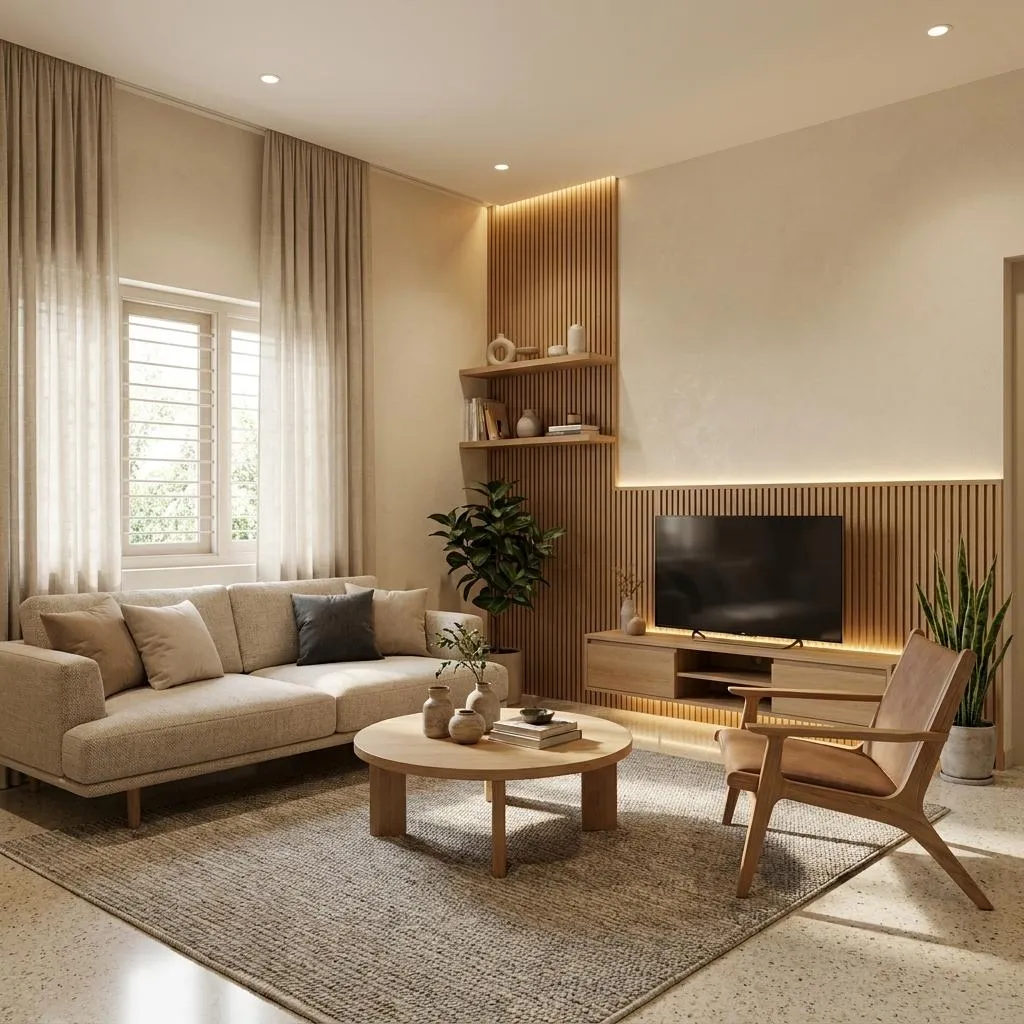
Japandi Living Room AI Prompt for Interior Redesign — AI generated image

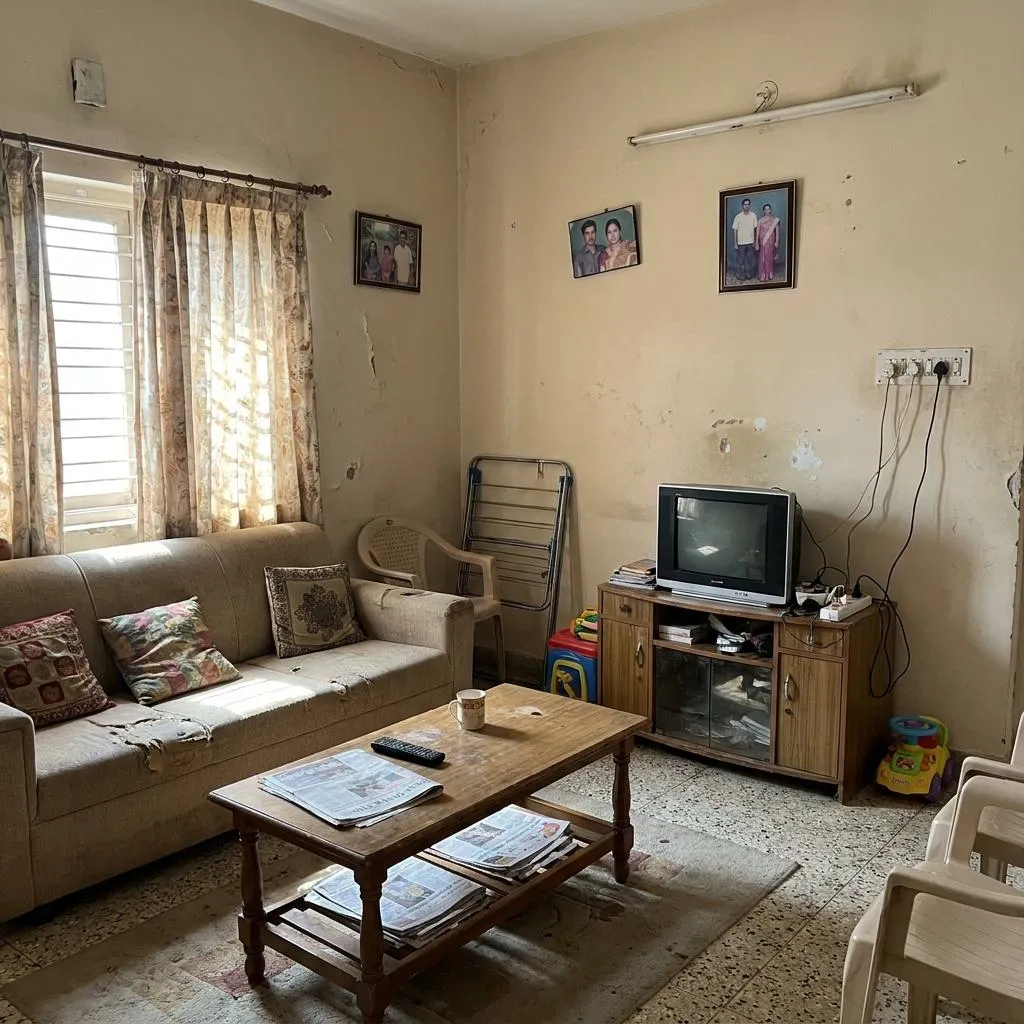
Before & After

Drag the slider to compare the original input with the AI result.

Japandi Living Room AI Prompt for Interior Redesign AI generated result AFTER
Japandi Living Room AI Prompt for Interior Redesign original input image BEFORE
Drag the center slider to compare

The Prompt

Copy-Paste Prompt
Transform the provided living room photograph into a sophisticated warm Japandi-inspired interior while preserving the exact existing room architecture, wall positions, ceiling height, windows, doors, floor boundaries, room proportions, camera angle and perspective. Completely redesign the interior within the existing space using a refined palette of warm ivory, natural oak, soft beige and muted charcoal. Replace the dated furniture with a low-profile premium neutral sofa, sculptural lounge chair, elegant natural-wood coffee table, minimalist media console and carefully proportioned storage. Introduce subtle architectural upgrades such as warm textured wall finishes, refined wood slat detailing, concealed ambient lighting and understated handcrafted decor. Add a few carefully selected indoor plants, natural linen curtains, soft textured cushions, a premium woven rug and minimal ceramic objects. Keep the room practical and realistically furnished. Do not make it look like an oversized luxury showroom. Preserve the original windows, doors, room dimensions and architectural structure exactly. Every new furniture piece must physically fit the existing space. Use soft natural daylight combined with warm indirect evening-style architectural lighting. Show authentic wood grain, linen fibers, ceramic texture, realistic glass reflections, natural shadows, subtle imperfections and believable material aging. High-end residential interior photography, architectural editorial photography, 24mm lens, physically accurate perspective and lighting, ultra-photorealistic, sophisticated, warm, calm and expensive but believable. STRICTLY DO NOT add new windows, doors, walls, rooms, fireplaces or architectural structures. Do not change the room footprint. The final image must clearly be the same living room after a professional renovation.
Subject Living room interior redesign
Environment Existing room architecture (walls, ceiling, windows, doors, floor boundaries, proportions)
Lighting Soft natural daylight, warm indirect evening-style architectural lighting
Style Japandi-inspired, sophisticated, warm, calm, ultra-photorealistic, high-end residential, architectural editorial, refined palette (ivory, oak, beige, charcoal), authentic textures

How to Use this Nano Banana Prompt

1

Open Nano Banana

Launch the AI image tool.

2

Add Reference

Upload a photo if the prompt needs one.

3

Paste Prompt

Copy and paste the prompt above.

4

Generate

Create your AI image.

About This Japandi Living Room AI Prompt for Interior Redesign Prompt

This **Japandi living room AI prompt** is engineered to transform an existing living room photograph into a sophisticated, warm, and calm Japandi-inspired interior. It meticulously preserves the original architectural elements such as wall positions, ceiling height, windows, doors, and overall room proportions. The prompt focuses on a complete interior redesign within these fixed boundaries, utilizing a refined color palette of warm ivory, natural oak, soft beige, and muted charcoal. The result is an ultra-photorealistic image showcasing a professional, high-end residential renovation.

This powerful **Japandi interior design prompt** is ideal for interior designers seeking to visualize concepts, homeowners dreaming of a renovation, or real estate professionals showcasing potential property upgrades. It allows for the rapid generation of stunning design mock-ups without the need for complex 3D modeling software. AI artists and architects can also leverage this prompt to explore design variations, create compelling portfolio pieces, or simply generate inspiring visual content for social media and blogs.

To use this **AI prompt for living room renovation**, begin by providing a clear photograph of the living room you wish to transform. Most advanced AI image generation tools allow you to upload a reference image. Paste the prompt, ensuring all specific instructions regarding architectural preservation and design elements are included. The AI will then interpret your existing space and apply the Japandi aesthetic, carefully replacing furniture and introducing new finishes while adhering to the original room structure.

Customization within this prompt is focused on refining the Japandi aesthetic. While the core architectural elements are preserved, you can subtly adjust the specified color palette (warm ivory, natural oak, soft beige, muted charcoal) to lean more towards one shade. Experiment with different "low-profile premium neutral sofa" styles or "sculptural lounge chair" designs. You can also specify variations in "warm textured wall finishes," "refined wood slat detailing," or the types of "carefully selected indoor plants" and "minimal ceramic objects" to further personalize the resulting image.

The resulting visuals, created with this **living room redesign AI prompt**, are perfect for inspiring clients, enhancing design portfolios, or generating engaging content for social media platforms like Instagram or Pinterest. The blend of ultra-photorealistic detail, authentic material textures, and sophisticated lighting ensures that the images are not only beautiful but also believable. This makes them highly effective for communicating design intent and showcasing the transformative power of a well-executed Japandi renovation.

Frequently Asked Questions

Common questions about this AI prompt and how to get the best results.

What kind of image does this Japandi living room AI prompt create?
This prompt transforms an existing living room photograph into a sophisticated, warm, and calm Japandi-inspired interior. It completely redesigns the space with new furniture, finishes, and decor, while strictly preserving the original room architecture and dimensions.
Can I use this prompt with any living room photograph?
Yes, this prompt is designed to work with any provided living room photograph. The key is that the AI will use your photo as a structural reference, then apply the detailed Japandi design elements within that exact architectural framework.
How does this prompt ensure the preservation of existing room architecture?
The prompt explicitly instructs the AI to preserve the exact existing room architecture, wall positions, ceiling height, windows, doors, floor boundaries, room proportions, camera angle, and perspective. This ensures the renovated image is clearly the same room.
What customization options are available within this Japandi interior design prompt?
You can customize the specific shades within the warm ivory, natural oak, soft beige, and muted charcoal palette. You can also describe specific styles for the low-profile sofa, sculptural lounge chair, or types of indoor plants and ceramic objects to tailor the aesthetic.
Which AI model is best suited for this interior transformation prompt?
This prompt is versatile and can be used with various advanced AI image generation models that support image-to-image transformation or provide strong control over architectural preservation, such as Midjourney, Stable Diffusion, or DALL-E 3 with appropriate prompting techniques.

Pro Tips for Better Results

  • Provide a high-resolution, well-lit photograph of the existing living room for the best transformation results.
  • Emphasize the "concealed ambient lighting" and "natural shadows" in your prompt for a truly sophisticated atmosphere.
  • Experiment with slight variations in the specified "warm ivory, natural oak, soft beige and muted charcoal" palette to fine-tune the mood.
  • Ensure the AI understands the "low-profile" and "minimalist" furniture requirements to maintain the Japandi aesthetic.
  • Highlight the request for "authentic wood grain, linen fibers, ceramic texture" to achieve maximum realism in the generated image.
Message here