
 Nano Banana
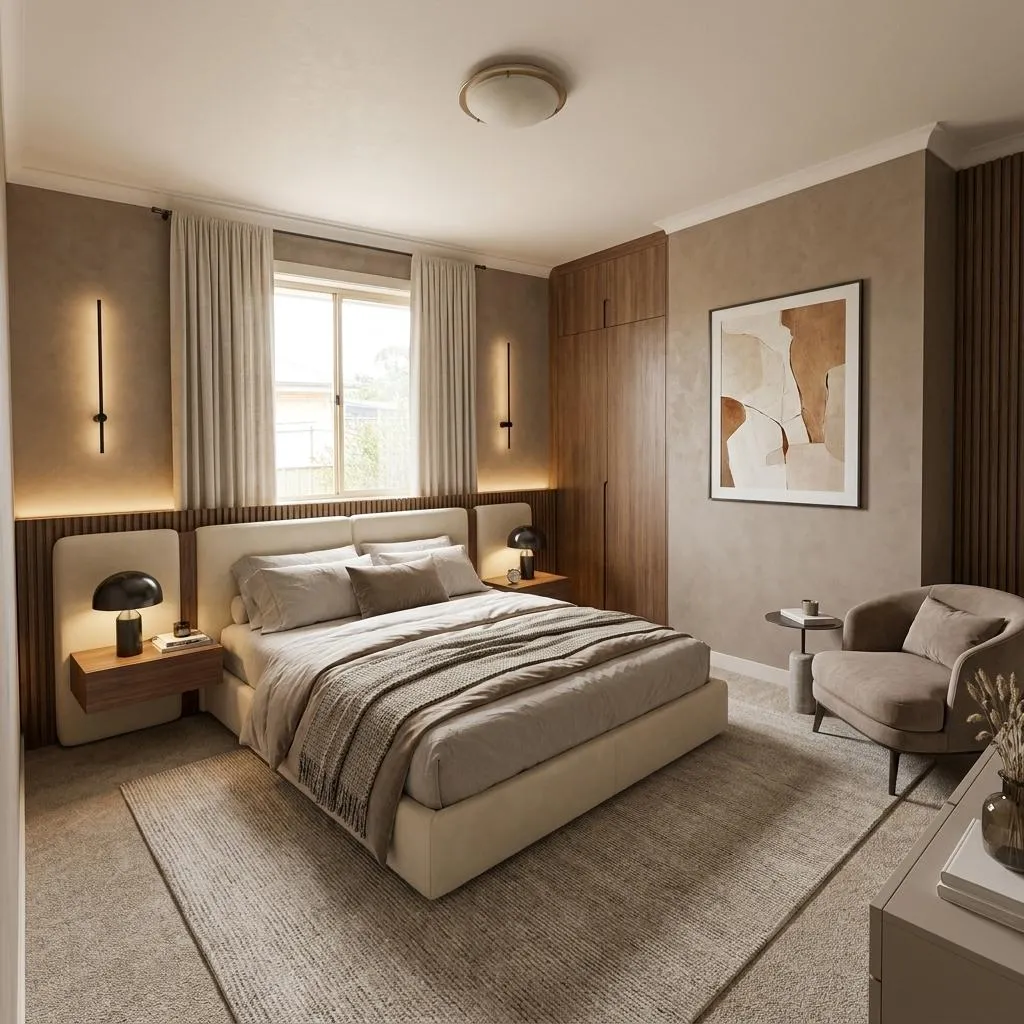
Before & After
Drag the slider to compare the original input with the AI result.
AFTER
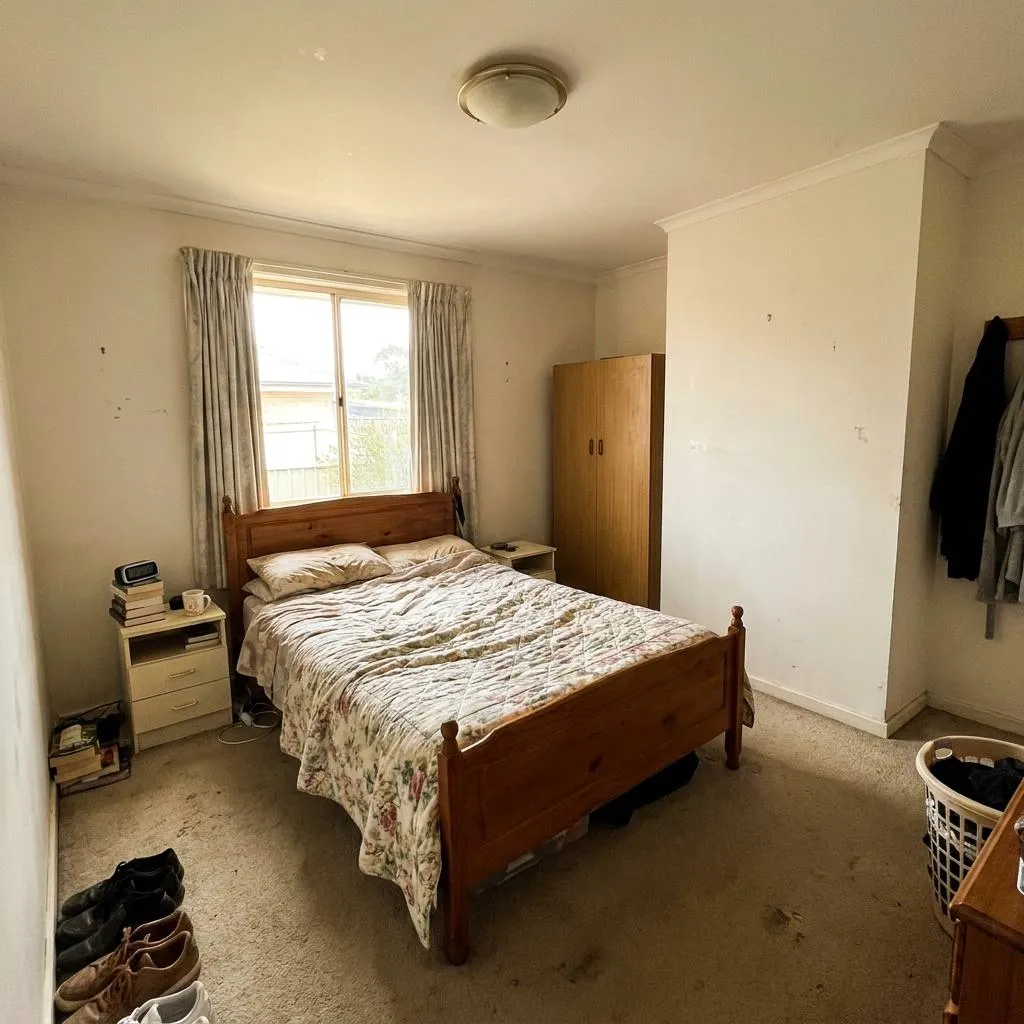 BEFORE
The Prompt
How to Use this Nano Banana Prompt
Open Nano Banana
Launch the AI image tool.
Add Reference
Upload a photo if the prompt needs one.
Paste Prompt
Copy and paste the prompt above.
Generate
Create your AI image.




About This AI Luxury Bedroom Design Transformation Prompt Prompt
This **AI luxury bedroom design prompt** is engineered to revolutionize any existing bedroom photograph, transforming it into a sophisticated, warm contemporary luxury space. It meticulously upgrades the interior design while strictly preserving the room's original architectural integrity, including wall positions, ceiling height, and window placements. The result is a stunningly photorealistic representation of a high-end bedroom, complete with a premium upholstered bed, refined floating bedside tables, and a dramatic feature wall crafted from warm taupe microcement and fluted panels.
This **AI luxury bedroom design prompt** is an invaluable tool for a diverse audience. Interior designers can use it to present aspirational concepts to clients, visualizing a complete luxury renovation. Homeowners planning an upgrade can experiment with different design elements, seeing how a contemporary bedroom AI prompt can bring their vision to life. Real estate professionals might leverage it for virtual staging, showcasing a property's potential, while AI artists can explore advanced photorealistic rendering techniques.
To effectively use this prompt, begin by providing your AI image generation tool with a clear, well-lit photograph of the bedroom you wish to transform. Then, input this detailed prompt. The AI will analyze the architectural framework of your provided image, applying specified design elements. This ensures the room remains recognizable while undergoing a complete stylistic overhaul, focusing solely on interior upgrades within the existing spatial dimensions.
Customization within this **photorealistic bedroom prompt** is achieved by subtly adjusting the detailed descriptions. For instance, while the prompt specifies a "warm taupe microcement" feature wall, you could explore variations of "warm beige" or "creamy ivory" for a different mood. The type of "contemporary designer lamps" or "understated piece of contemporary artwork" can be further specified. Additionally, fine-tune material descriptions like "realistic fabric fibers" or "natural wood grain" to introduce specific textures or finishes.
The resulting visual style, characterized by "professional luxury residential interior photography" and an "ultra-photorealistic" finish, makes this content exceptionally useful. Images generated with this **AI luxury bedroom design prompt** are perfect for social media showcases, interior design portfolios, or editorial features. The emphasis on realistic lighting, natural shadows, and subtle material imperfections ensures the final output looks like a genuine, high-end renovation, engaging audiences and inspiring real-world design projects.
Frequently Asked Questions
Common questions about this AI prompt and how to get the best results.
Pro Tips for Better Results
- Start with a High-Quality Base: Always use a well-composed, high-resolution photograph of your bedroom as the input to ensure the AI has sufficient detail to work with.
- Refine the Color Palette: While a warm, restrained palette is suggested, specify exact shades of "warm beige" or "creamy ivory" to fine-tune the room's overall mood and sophistication.
- Detail Specific Furniture: Instead of just "contemporary designer lamps," try specifying "minimalist brass pendant lamps" or "sculptural ceramic table lamps" for more personalized results.
- Leverage Architectural Lighting: Emphasize the "warm indirect architectural lighting" and "concealed ambient lighting" in your prompt to ensure the AI creates a truly dramatic and layered lighting scheme.
- Consider Negative Prompts: If your AI model supports it, use negative prompts to explicitly exclude elements you don't want, such as "cluttered," "unrealistic proportions," or "cold lighting."