Create Realistic Candid Wedding Couple Photos with AI

Nano Banana Nano Banana
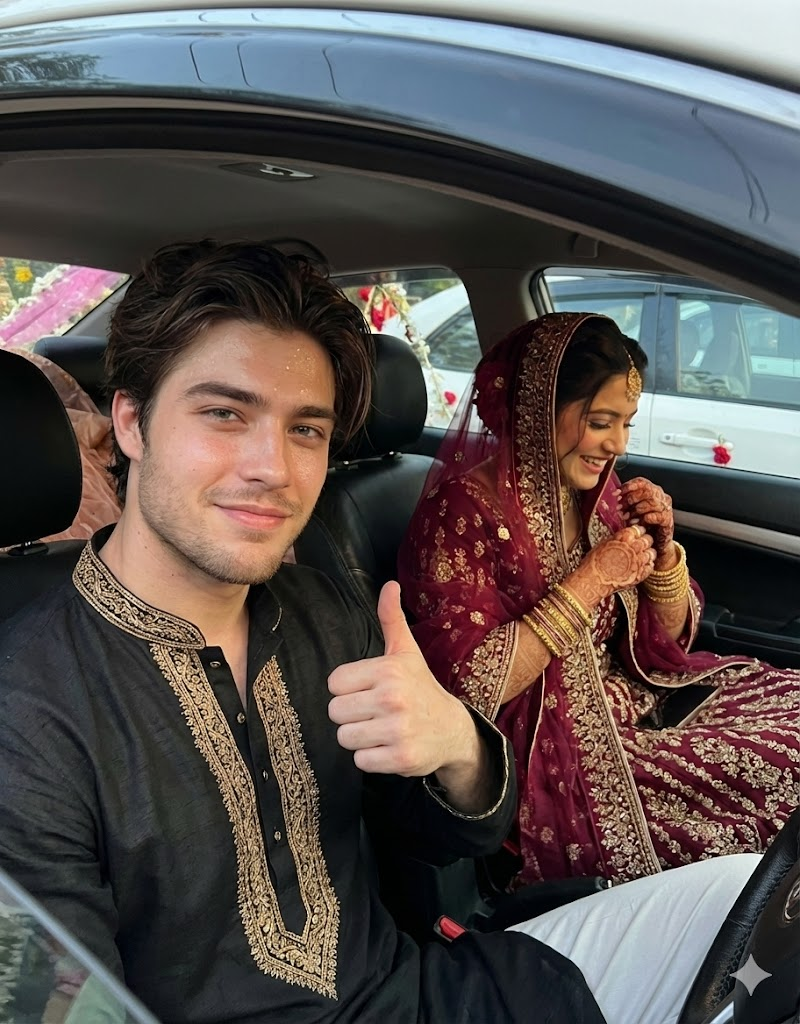
Create Realistic Candid Wedding Couple Photos with AI — AI generated image

The Prompt

Copy-Paste Prompt
Use uploaded reference image for strict identity preservation - exact same face, facial structure, skin tone. Ultra-realistic 8K smartphone candid wedding photo inside a parked car post shaadi. Groom in driver seat wearing black kurta, giving a casual thumbs-up with a playful smile, eyes looking slightly toward the camera. Bride in front passenger seat wearing maroon bridal lehenga with heavy gold embroidery, dupatta over head, softly laughing while adjusting her bangles. Natural skin texture,
Subject Groom and Bride (a couple)
Environment Inside a parked car, post-shaadi
Lighting Not specified (implied natural for candid)
Style Ultra-realistic, 8K, candid, smartphone photo

How to Use this Nano Banana Prompt

1

Open Nano Banana

Launch the AI image tool.

2

Add Reference

Upload a photo if the prompt needs one.

3

Paste Prompt

Copy and paste the prompt above.

4

Generate

Create your AI image.

About This Create Realistic Candid Wedding Couple Photos with AI Prompt

This realistic wedding couple photo prompt is engineered to generate stunning, ultra-realistic 8K candid images of a newlywed couple inside a parked car, immediately following their 'shaadi' (wedding ceremony). It meticulously details the scene, featuring the groom in a black kurta and the bride in a maroon bridal lehenga with heavy gold embroidery, her dupatta gracefully over her head. The prompt captures genuine emotions, with the groom giving a playful thumbs-up and the bride softly laughing while adjusting her bangles, ensuring a truly authentic and memorable visual.

This prompt is an invaluable resource for anyone looking to visualize or create specific post-wedding moments with high fidelity. Wedding planners can use it to present concept art to clients, while couples can generate personalized keepsakes or inspiration for their own wedding photography. Content creators and digital artists will find it perfect for crafting narratives or adding a unique touch to their projects, especially those focusing on culturally rich wedding themes. The emphasis on identity preservation also makes it ideal for recreating specific individuals.

To use this realistic wedding couple photo prompt effectively, simply copy the entire text into your preferred AI image generation tool. Crucially, the prompt specifies "Use uploaded reference image for strict identity preservation - exact same face, facial structure, skin tone." This means you should provide a clear reference image of the individuals you wish to depict. The AI will then utilize this reference to ensure the generated faces accurately match, bringing your vision to life with remarkable precision and realism.

Customization is key to making this prompt uniquely yours. While the core scene is set, you can experiment with altering the colors of the groom's kurta or the bride's bridal lehenga and embroidery. Consider adjusting their expressions—perhaps a more serene smile for the bride or a more pronounced laugh. You could also specify details about the car's interior or the time of day to influence the ambient lighting, further enhancing the candid feel. These small tweaks allow you to tailor the output to perfectly match your desired aesthetic.

The ultra-realistic and candid style produced by this prompt makes it exceptionally useful for various applications. For social media, these images can create engaging content for platforms like Instagram or Pinterest, telling a compelling story of post-wedding joy. In digital art, they serve as powerful visual assets for storytelling or mood boards. The ability to generate such high-quality, emotionally resonant images provides a versatile tool for capturing the intimate and joyful moments that define a wedding celebration.

Frequently Asked Questions

Common questions about this AI prompt and how to get the best results.

How do I ensure the faces in the generated image match my reference photos?
The prompt explicitly states 'Use uploaded reference image for strict identity preservation.' You must upload clear reference images of the individuals to your AI tool for it to accurately replicate their faces, facial structure, and skin tone.
Can I change the colors of the wedding attire mentioned in the prompt?
Yes, you can easily customize the attire colors. Simply replace 'black kurta' and 'maroon bridal lehenga with heavy gold embroidery' with your desired colors and details, such as 'navy blue kurta' or 'emerald green lehenga with silver embroidery'.
What kind of visual style does this prompt produce?
This prompt is designed for an 'Ultra-realistic 8K smartphone candid wedding photo' style. It aims for high detail, natural skin texture, and a spontaneous, unposed feel, as if captured by a smartphone camera.
Is this prompt suitable for different cultural wedding themes beyond 'shaadi'?
While 'shaadi' implies a South Asian context, the prompt's structure is adaptable. You can modify the attire descriptions (e.g., 'white wedding dress,' 'tuxedo') and remove 'post shaadi' to suit other cultural wedding themes while maintaining the candid, in-car setting.
What does 'post shaadi' imply in this AI image prompt?
'Post shaadi' indicates that the scene takes place immediately after the wedding ceremony. This context helps the AI understand the mood, potential exhaustion, and intimate moments that often follow such an event, contributing to the candid feel.

Pro Tips for Better Results

  • Always upload a high-quality reference image to ensure strict identity preservation for the faces.
  • Experiment with specifying the car model or interior details to match a particular aesthetic.
  • Adjust the described expressions (e.g., 'gentle smile' instead of 'playful smile') to fine-tune the mood of the couple.
  • Detail the specific type of gold embroidery or fabric textures for the lehenga to add more visual richness.
  • Consider adding a subtle background element visible through the car window to enhance the 'parked car' environment.
Message here



