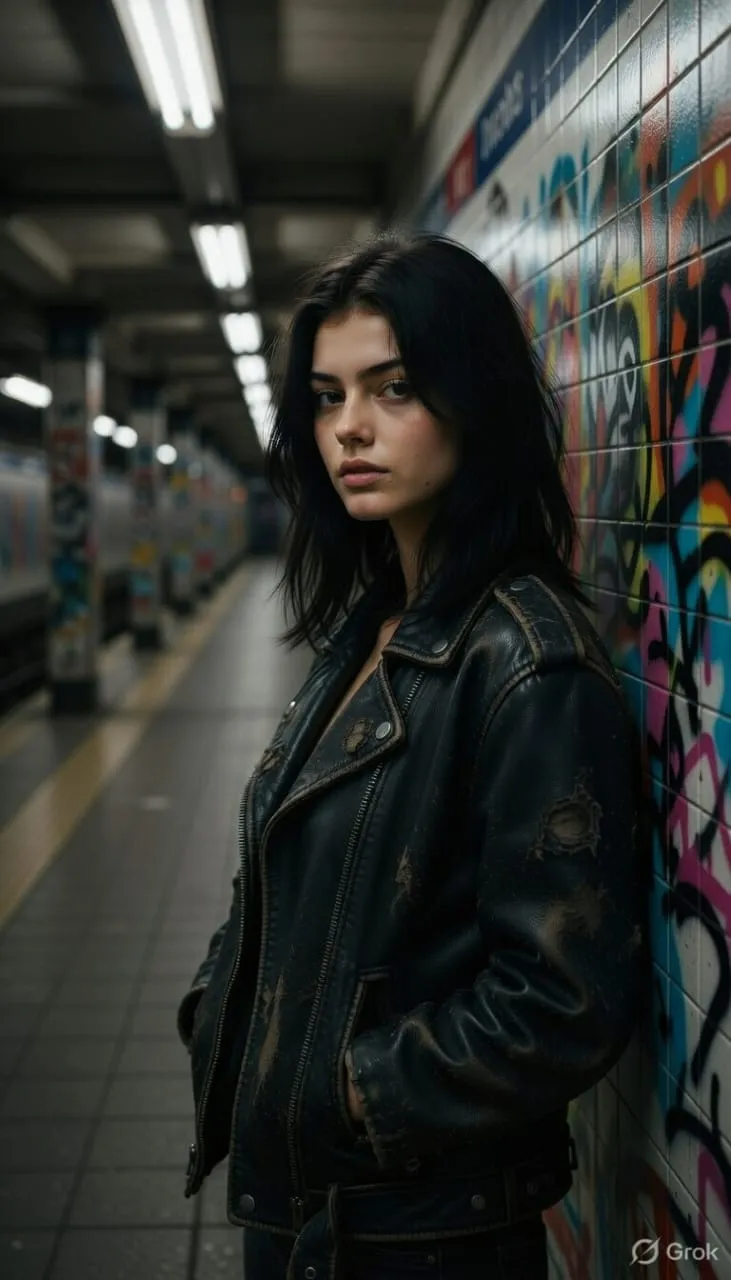
Moody Urban Realism Portrait AI Prompt

Nano Banana Nano Banana
Moody Urban Realism Portrait AI Prompt — AI generated image

The Prompt

Copy-Paste Prompt
Ultra-realistic moody portrait of a man or woman (from uploaded image), messy hair covering part of the forehead, wearing a distressed black leather jacket. Harsh white fluorescent light from above like an empty subway station, creating sharp shadows under the eyes. Background blurred industrial station interior. Gritty urban realism.
Subject Man or woman (from uploaded image), messy hair covering part of the forehead, wearing a distressed black leather jacket.
Environment Blurred industrial station interior, like an empty subway station.
Lighting Harsh white fluorescent light from above, creating sharp shadows under the eyes.
Style Ultra-realistic, moody, gritty urban realism.

How to Use this Nano Banana Prompt

1

Open Nano Banana

Launch the AI image tool.

2

Add Reference

Upload a photo if the prompt needs one.

3

Paste Prompt

Copy and paste the prompt above.

4

Generate

Create your AI image.

About This Moody Urban Realism Portrait AI Prompt Prompt

Unlock the power of AI to create stunning, ultra-realistic moody portrait images with this specialized prompt. Designed to capture a raw, intense aesthetic, this prompt generates visuals of a man or woman, featuring messy hair partially covering the forehead and a distinctive distressed black leather jacket. The scene is illuminated by harsh white fluorescent light from above, reminiscent of an empty subway station, casting dramatic, sharp shadows under the eyes. A blurred industrial station interior forms the background, enhancing the overall gritty urban realism that defines this unique visual style.

This moody portrait AI prompt is ideal for a diverse audience, including artists seeking character inspiration, graphic designers needing compelling visuals, or content creators aiming for a dark and dramatic aesthetic. It's particularly useful for those working on album art, book covers, or social media campaigns that require an edgy, authentic urban feel. Photographers looking to experiment with dramatic lighting and urban backdrops will also find this prompt an invaluable tool for generating unique concepts and reference images for their work.

To use this prompt, simply copy the entire text and paste it into your preferred AI image generator. The key feature is the ability to specify the subject via an "uploaded image," allowing you to maintain consistency or explore variations of a particular person. Ensure your AI tool supports image references for the best results. Experiment with the prompt in different generators to see how each interprets the "gritty urban realism" and "harsh white fluorescent light" for distinct outcomes.

Customization options within this prompt are focused on enhancing the core aesthetic. While the central elements like the distressed black leather jacket and the harsh fluorescent lighting are crucial to the look, you can subtly adjust the description of the messy hair or the level of distress on the jacket. You might also experiment with adding minor details to the "blurred industrial station interior" if your AI model allows, to fine-tune the urban environment without losing the overall mood. The power lies in iterating on these specific visual attributes.

This specific visual style, characterized by its ultra-realistic moody portrait, sharp shadows, and gritty urban realism, offers significant utility for various creative projects. On social media, such images can create a strong, memorable impact, standing out from more conventional content. For photography enthusiasts, it provides an excellent blueprint for understanding and replicating dramatic lighting scenarios and atmospheric compositions. Ultimately, this AI prompt serves as a powerful starting point for generating visually striking and emotionally resonant images that capture a compelling narrative.

Frequently Asked Questions

Common questions about this AI prompt and how to get the best results.

What kind of image will this moody portrait AI prompt create?
This prompt is designed to generate an ultra-realistic, moody portrait featuring a man or woman. It emphasizes gritty urban realism, harsh fluorescent lighting, sharp shadows, and a distressed black leather jacket against a blurred industrial background.
How can I specify the subject's appearance using this prompt?
The prompt explicitly states '(from uploaded image)', indicating that you should provide a reference image to your AI generator. This allows you to guide the AI on the specific person you wish to feature in the portrait.
Which AI models work best with this gritty urban realism prompt?
While no specific AI model is named, this prompt is designed for general AI image generators that can interpret detailed textual descriptions and handle image uploads. Midjourney, Stable Diffusion, or similar advanced text-to-image models are generally good choices for photorealistic results.
Can I change the clothing or setting in this prompt?
The prompt specifically details a 'distressed black leather jacket' and a 'blurred industrial station interior'. While you can experiment with minor alterations, changing these core elements would significantly deviate from the intended 'gritty urban realism' and 'moody portrait' style.
What defines the 'gritty urban realism' style in this image?
The 'gritty urban realism' in this prompt is characterized by the industrial station environment, the harsh fluorescent lighting creating dramatic shadows, and the raw, unpolished aesthetic of the subject's messy hair and distressed leather jacket, all contributing to a raw and authentic feel.

Pro Tips for Better Results

  • Utilize a high-quality reference image for the 'uploaded image' feature to ensure your chosen subject's likeness is accurately captured.
  • Experiment with varying the intensity of 'messy hair' in your prompt for subtle changes in the subject's overall mood and appearance.
  • Consider adding specific details to the 'distressed black leather jacket' description if you want to emphasize certain textures or wear patterns.
  • Ensure your AI model strongly interprets 'harsh white fluorescent light from above' to achieve the intended dramatic shadows and stark atmosphere.
  • Adjust the level of 'blurred' in the background description to control the focus and depth of field, maintaining the industrial station feel without distraction.
Message here



