
 Nano Banana
The Prompt
How to Use this Nano Banana Prompt
Open Nano Banana
Launch the AI image tool.
Add Reference
Upload a photo if the prompt needs one.
Paste Prompt
Copy and paste the prompt above.
Generate
Create your AI image.






About This Saree Portrait AI Prompt — Editorial Style Prompt
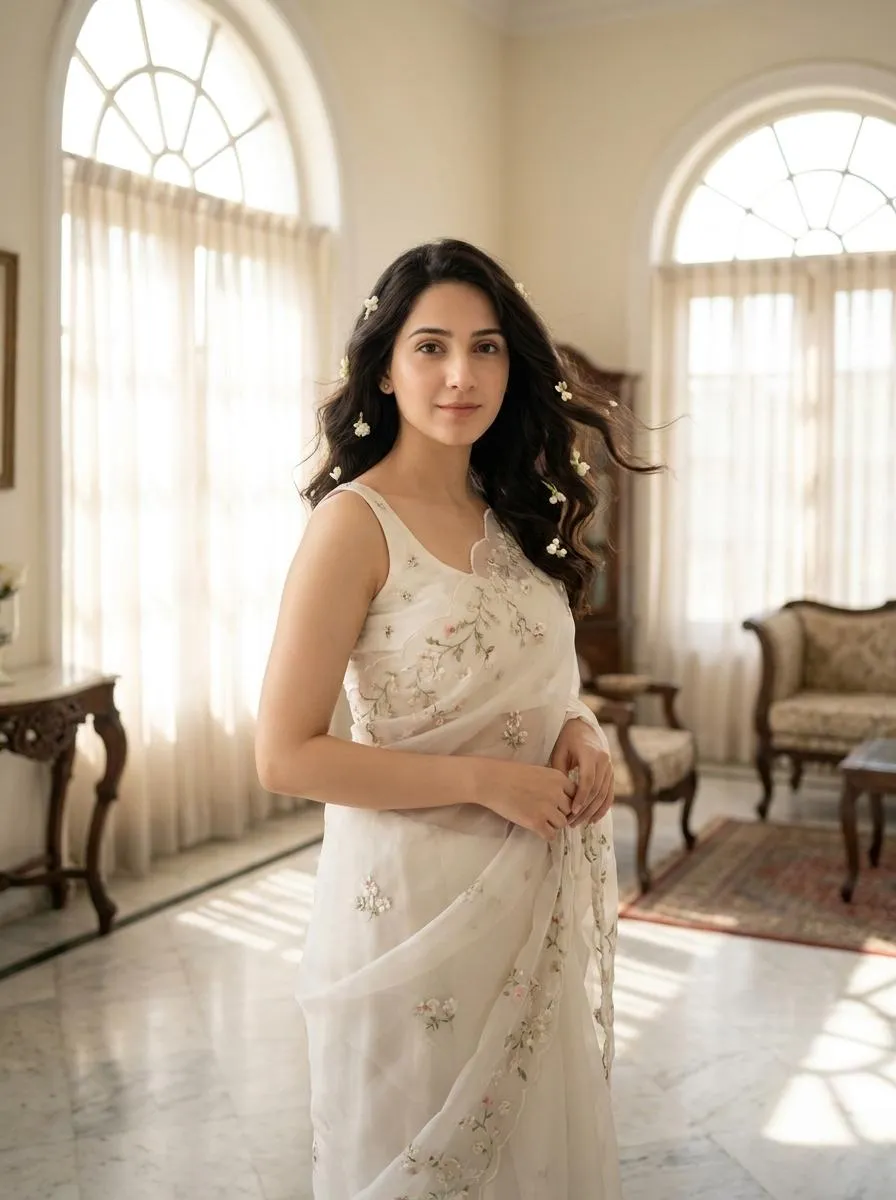
This saree editorial portrait AI prompt is expertly crafted to generate an elegant, ultra-realistic 4K HD photograph of a subject. The resulting image features a woman dressed in a dreamy white organza saree, adorned with delicate floral embroidery and a perfectly matching sleeveless blouse. Her soft, wavy hair is depicted gently moving in a breeze, intricately woven with tiny white jasmine flowers, adding a touch of ethereal beauty to the overall composition. The subject is positioned within a bright heritage mansion, characterized by its grand arched windows and pristine marble flooring, bathed in soft morning sunlight.
This specific prompt is an invaluable asset for a diverse range of content creators, digital artists, and social media enthusiasts. Fashion bloggers and stylists seeking to visualize new collections or editorial concepts will find it particularly useful for creating high-quality mood boards or virtual lookbooks. Additionally, Instagram influencers aiming for a clean, luxurious, and feminine aesthetic, akin to popular Pinterest trends, can leverage this prompt to generate unique, aesthetic imagery without the need for expensive photoshoots. It's also ideal for photographers exploring new styles or clients wanting to preview portrait concepts before a session.
To utilize this saree editorial portrait AI prompt, simply open your preferred AI image generator, such as ChatGPT, Gemini, or even tools like Midjourney or DALL-E 3. If your chosen platform supports it, upload the image whose face you wish to maintain, ensuring the "keep face identical" feature is activated. Then, copy and paste the entire prompt into the input field. For optimal results, ensure your generation settings prioritize "ultra-realistic" or "photorealistic" output and specify a 4K HD resolution if available, as these parameters are crucial for achieving the intended high-quality visual.
While the prompt specifies a dreamy white organza saree, you can easily modify key elements to explore different creative directions. Experiment with changing the saree's color (e.g., "blush pink silk saree") or fabric texture (e.g., "embroidered velvet saree") to alter the mood. Consider adjusting the flower type woven into the hair, perhaps opting for "delicate pink roses" or "vibrant marigolds" for a different cultural or aesthetic feel. You could also vary the mansion's architectural style or the time of day for lighting, such as "golden hour glow" or "soft evening light," to achieve diverse ambiance while still leveraging the core structure of this saree editorial portrait AI prompt.
The appeal of this visual style lies in its blend of traditional elegance with contemporary Pinterest-inspired aesthetics, making it highly relevant in today's digital landscape. The focus on ultra-realistic 4K HD photography, combined with a clean and luxurious mood, aligns perfectly with current trends in high-quality visual content. AI image generation excels at rendering detailed textures like organza and intricate floral embroidery, making prompts like this highly effective. We encourage you to try this saree editorial portrait AI prompt on NanoAIPrompts.com to experience its transformative power and generate your own breathtaking, rankable imagery.
Frequently Asked Questions
Common questions about this AI prompt and how to get the best results.
Pro Tips for Better Results
- Always upload a clear, well-lit reference image for the face to ensure accurate replication across generations.
- Experiment with subtle variations in the "heritage mansion" description, such as "Victorian mansion" or "Indian palace," to explore different architectural backdrops.
- Adjust the "soft morning sunlight" to "golden hour glow" or "diffused daylight" to dramatically alter the mood and lighting of the portrait.
- Specify additional details for the floral embroidery on the saree, like "intricate gold threadwork" or "pastel-colored blossoms," to enhance richness.
- After generating, upscale the image using a dedicated AI upscaler to further refine details and achieve true 4K HD quality.