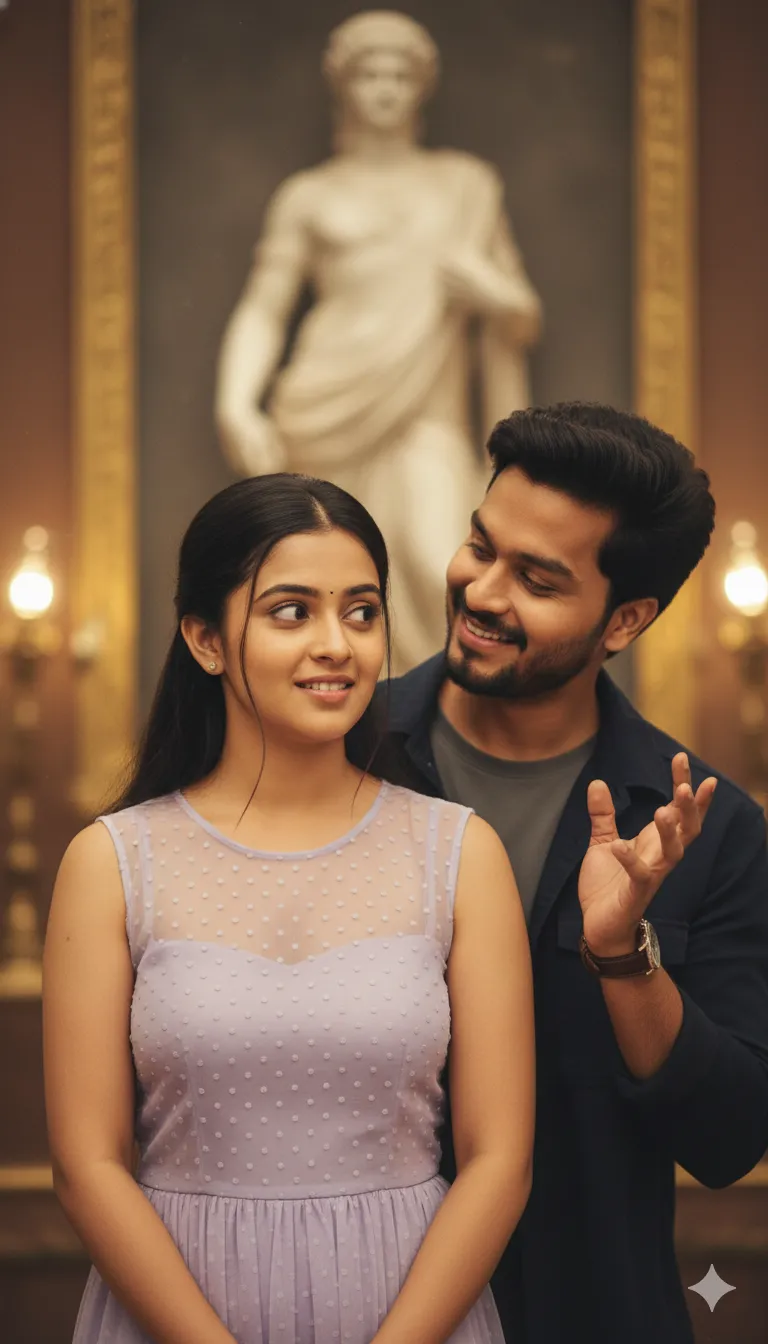
Cinematic South Indian Couple Portrait Prompt

Any Model
Cinematic South Indian Couple Portrait Prompt — AI generated image

The Prompt

Copy-Paste Prompt
Ultra-realistic cinematic romantic shot of a South Indian couple indoors, man standing close behind woman teasing playfully, warm golden lighting, soft bokeh lamps, classical statue blurred in background, woman in light lavender sheer sleeveless dress with surprised side glance, man in dark jacket with styled hair and beard, shallow depth of field, dreamy film grain, romantic mood
Subject A South Indian couple, with a man standing close behind a woman teasing playfully, the woman in a light lavender sheer sleeveless dress with a surprised side glance, and the man in a dark jacket with styled hair and a beard.
Environment An indoor setting featuring a classical statue blurred in the background.
Lighting Warm golden lighting complemented by soft bokeh lamps and a shallow depth of field.
Style Ultra-realistic, cinematic romantic shot with dreamy film grain.

How to Use this Any Model Prompt

1

Open Any Model

Launch the AI image tool.

2

Add Reference

Upload a photo if the prompt needs one.

3

Paste Prompt

Copy and paste the prompt above.

4

Generate

Create your AI image.

About This Cinematic South Indian Couple Portrait Prompt Prompt

This AI image prompt generates an ultra-realistic cinematic romantic shot of a South Indian couple indoors. The composition features a man standing close behind a woman, teasing her playfully, while the woman gives a surprised side glance. The visual storytelling centers around genuine emotion and a tender moment captured in an intimate indoor setting.

Photographers, digital artists, and romantic fiction creators will find this couple prompt ideal for generating expressive lifestyle imagery. It works exceptionally well for mood boards, digital storytelling projects, creative concept art, and couples looking to visualize romantic indoor photography without stepping into a physical studio.

To use this prompt effectively, copy the exact text and paste it into your preferred AI image generator. Because the prompt relies on descriptive details rather than technical camera jargon, most advanced diffusion models will interpret the subject matter, lighting cues, and mood accurately to produce high-quality results.

While the core composition is predefined, you can easily customize elements such as clothing colors, specific styling details, or the background elements. Adjusting the dress color or jacket style allows you to tailor the final portrait to specific aesthetic preferences while maintaining the core romantic atmosphere and indoor setting.

The resulting visual style blends warm golden lighting with dreamy film grain and a shallow depth of field, making it perfect for social media storytelling, mood boards, or personal creative projects. The soft bokeh lamps and blurred classical statue in the background add depth, ensuring the final output looks like a professional film still rather than a standard AI generation.

Frequently Asked Questions

Common questions about this AI prompt and how to get the best results.

What kind of image does this prompt create?
This prompt creates an ultra-realistic, cinematic indoor portrait of a South Indian couple sharing a playful, romantic moment with warm golden lighting and film grain.
How do I use this AI image prompt?
Simply copy the source prompt text from our library and paste it into your preferred AI image generation tool that supports detailed natural language descriptions.
Can I change the clothing colors in the prompt?
Yes, you can modify the clothing descriptions, such as the woman's light lavender dress or the man's dark jacket, to match your preferred color palette.
What makes this prompt look cinematic?
The cinematic look is achieved through specific descriptive elements including warm golden lighting, soft bokeh lamps, a shallow depth of field, and dreamy film grain.
Do I need a specific AI model to run this prompt?
This prompt works well across most advanced AI image generators capable of interpreting complex narrative scenes and photographic styles.

Pro Tips for Better Results

  • Keep the core descriptive phrases intact when adapting the prompt to maintain the romantic mood and lighting cues.
  • Experiment with different clothing color descriptions if you want to alter the wardrobe while preserving the couple's dynamic.
  • Ensure your AI image generator's aspect ratio is set to portrait mode (like 4:5 or 9:16) to capture the vertical composition properly.
  • If your AI model supports style weights, slightly increase the weight on the film grain and cinematic lighting terms for a more authentic look.
  • Use reference images if your chosen AI tool allows image prompting to guide the specific facial features and cultural styling.
Message here



