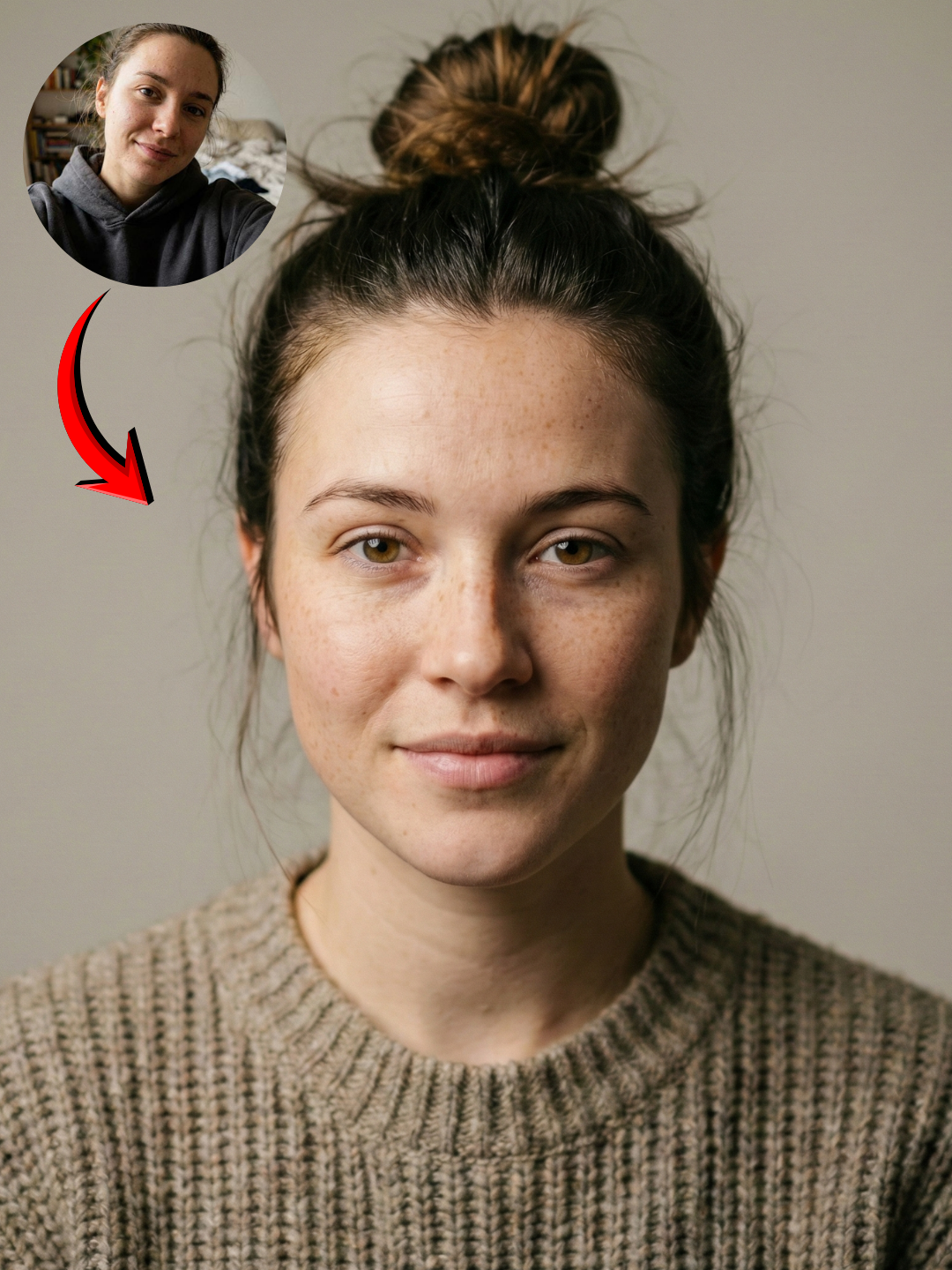
The Prompt
How to Use this Nano Banana Prompt
Open Nano Banana
Launch the AI image tool.
Add Reference
Upload a photo if the prompt needs one.
Paste Prompt
Copy and paste the prompt above.
Generate
Create your AI image.
About This Nano Banana Face Lock Prompt for Photorealistic Portraits Prompt
This Nano Banana face lock prompt is engineered to generate highly photorealistic and cinematic portraits of a young woman. Utilizing advanced AI capabilities, it focuses on maintaining impressive face consistency, making it ideal for projects requiring a specific look or character. The output images are rendered with an emphasis on 8k resolution and sharp focus, delivering professional-grade visual quality that mimics high-end photography.
This prompt is perfect for content creators, digital artists, and photographers looking to produce consistent character imagery without extensive manual editing. Whether you need a series of portraits for a social media campaign, character designs for a narrative project, or simply wish to create stunning, lifelike images from a reference photo, this Nano Banana portrait prompt offers unparalleled control. It's particularly useful for maintaining a unified visual identity across multiple generated images.
To use this Nano Banana face lock prompt, you'll typically input the provided text into the Nano Banana Pro AI image generator. The crucial element is the "reference_id": "user_upload_01" parameter, which indicates you will upload a reference image of the face you wish to maintain consistency with. Ensure your reference image is clear and well-lit for the best results. The AI will then generate a new portrait, applying the cinematic realism and studio softbox lighting while preserving the facial features from your uploaded reference.
Customization with this prompt primarily revolves around the input reference image and subtle adjustments to the core parameters. While the prompt specifies "photorealistic portrait of a young woman," you can influence the specific facial features and expressions by changing your reference photo. The "studio softbox" lighting ensures a professional, even illumination, but its intensity can sometimes be tweaked within the Nano Banana interface if options are available. The "85mm lens, f/1.8 aperture" contributes to a classic portrait look with pleasing background blur, a characteristic you'll observe in the generated images.
The cinematic realism and sharp focus produced by this AI face consistency prompt make it exceptionally useful for a variety of visual applications. On social media, high-quality, consistent portraits grab attention and build brand recognition. For photographers, it offers a powerful tool for conceptualizing shoots or generating unique reference material. In creative projects, maintaining a character's face across different scenarios is invaluable, and this AI face swap prompt delivers that consistency with stunning photographic quality, saving time and resources in production.
Frequently Asked Questions
Common questions about this AI prompt and how to get the best results.
Pro Tips for Better Results
- Select a High-Quality Reference Image: For optimal face consistency, use a well-lit, clear, and high-resolution reference photo where the subject's face is clearly visible and in focus.
- Experiment with Expressions: While the face is locked, the AI can sometimes interpret subtle expressions. Try using reference images with different emotions to see varied results in your cinematic AI portrait.
- Understand Studio Softbox Lighting: This lighting style is designed to be soft and even. If you desire a more dramatic or moody look, you might need to explore different prompts or modify the lighting parameter if your AI tool allows.
- Leverage the 85mm Lens Effect: The 85mm f/1.8 setting is ideal for isolating the subject. Frame your reference image or visualize the output with this in mind to achieve a professional, shallow depth-of-field effect.
- Utilize Negative Prompts: The included negative prompts ("distorted face", "bad eyes", "cartoonish", "low quality", "blur") are crucial for maintaining quality. Consider adding more specific negative terms if you encounter undesired artifacts.



