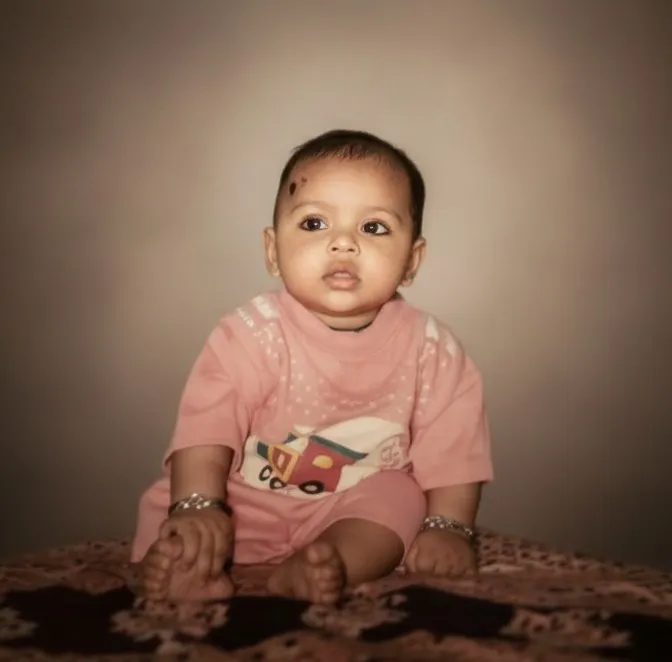
Old photo enhaced: Exact Face Match

Any Model
Old photo enhaced: Exact Face Match — AI generated image

The Prompt

Copy-Paste Prompt
Ultra-realistic luxury portrait using the uploaded image as exact face reference (100% identical). Soft studio lighting, clean bright exposure, natural skin texture, sharp eyes, realistic hair detail. Elegant blurred background, cinematic color grading. Full-frame DSLR look, 85mm f/1.8, 8K realism, no face change, no cartoon, no over-smoothing.
Subject Ultra-realistic luxury portrait, exact face reference (100% identical)
Environment Elegant blurred background
Lighting Soft studio lighting, clean bright exposure
Style Full-frame DSLR look, 85mm f/1.8, 8K realism, cinematic color grading, natural skin texture, sharp eyes, realistic hair detail, no face change, no cartoon, no over-smoothing

How to Use this Any Model Prompt

1

Open Any Model

Launch the AI image tool.

2

Add Reference

Upload a photo if the prompt needs one.

3

Paste Prompt

Copy and paste the prompt above.

4

Generate

Create your AI image.

About This Old photo enhaced: Exact Face Match Prompt

This advanced AI prompt is engineered to generate an ultra-realistic luxury portrait, mirroring an uploaded image with 100% identical facial features. The resulting image showcases soft studio lighting that bathes the subject in a clean, bright exposure, highlighting natural skin texture and incredibly sharp eyes. Every strand of hair is rendered with realistic detail, set against an elegantly blurred background, all unified by sophisticated cinematic color grading. The final output achieves a full-frame DSLR look, specifically emulating an 85mm f/1.8 lens, and boasts stunning 8K realism without any cartoonish distortion or over-smoothing of details.

This powerful realistic luxury portrait AI prompt is ideal for a diverse range of users, from professional photographers seeking to enhance their portfolios with AI-generated concepts to content creators aiming for high-fidelity social media imagery. Influencers and personal branding experts can leverage this prompt to create consistent, polished visual identities across platforms. Additionally, artists exploring hyperrealism without the extensive setup of a traditional shoot will find this tool invaluable for generating precise, high-quality reference images. It's particularly useful for anyone needing to maintain exact facial consistency across different visual contexts.

To begin creating your own hyperrealistic images, simply open your preferred AI image generator, such as ChatGPT or Gemini. First, upload the reference image whose face you wish to replicate identically; this is crucial for the "exact face reference" instruction. Next, copy and paste this entire realistic luxury portrait AI prompt directly into the input field. While specific settings might vary slightly between platforms, generally ensure you select an aspect ratio suitable for portraits (e.g., 2:3 or 9:16) and a high generation quality setting to fully leverage the 8K realism. The AI will then process your request, aiming to produce an image that captures the essence of luxury and photorealism.

You can easily modify this prompt to achieve a variety of nuanced results while maintaining the core realistic luxury portrait AI prompt aesthetic. To alter the mood, experiment with changing "soft studio lighting" to "dramatic chiaroscuro lighting" or "golden hour glow." For a different background feel, substitute "elegant blurred background" with "subtle bokeh city lights" or "minimalist white backdrop." You could also adjust the cinematic color grading by specifying "warm sepia tones" or "cool, desaturated palette." Remember to keep the "exact face reference" and "no face change" instructions consistent if facial identity is paramount, but feel free to add details like specific clothing styles or accessories.

The demand for high-fidelity, photorealistic AI-generated imagery, especially portraits, has surged dramatically as AI capabilities advance. This prompt taps into the growing trend of leveraging AI for personal branding, digital art, and marketing, where consistency and quality are paramount. Its ability to maintain an "exact face reference" is particularly powerful, addressing a common challenge in AI generation where faces can often vary. By providing a highly detailed and specific set of instructions, this prompt guides the AI to produce results that are not only visually stunning but also technically precise, making it a valuable asset for creators. Explore this and other cutting-edge prompts at NanoAIPrompts.com to elevate your AI art.

Frequently Asked Questions

Common questions about this AI prompt and how to get the best results.

What kind of image output can I expect from this prompt?
You can expect an ultra-realistic luxury portrait with 8K detail and exact facial replication from your uploaded reference. The image will feature soft studio lighting, natural skin textures, and cinematic color grading, emulating a professional DSLR look.
How do I ensure the AI uses my uploaded face reference perfectly?
The prompt explicitly includes "using the uploaded image as exact face reference (100% identical)" and "no face change." Always ensure your AI platform supports image uploads for reference and prioritize this instruction within the prompt.
Can I change the lighting or background with this prompt?
Yes, you can modify "Soft studio lighting" to "dramatic backlighting" or "golden hour glow," and "Elegant blurred background" to "minimalist urban backdrop" or "lush garden setting" to customize the scene. Ensure your changes are specific and descriptive.
Which AI image generators are best suited for this realistic luxury portrait AI prompt?
This prompt is highly effective with advanced AI image generators like ChatGPT (with DALL-E 3) and Gemini, which excel at interpreting detailed instructions and maintaining facial consistency from reference images. Ensure you're using a version that supports image uploads and high-fidelity output.
Is it possible to use the generated portraits for commercial purposes?
The commercial use of AI-generated images depends on the terms of service of the specific AI platform you are using. Always review the usage rights and licensing agreements provided by ChatGPT, Gemini, or any other AI tool before using outputs for commercial projects.

Pro Tips for Better Results

  • Always upload a high-resolution, well-lit reference image for the best face replication accuracy.
  • Specify desired attire or accessories in the prompt to complement the "luxury portrait" theme.
  • Experiment with different cinematic color grading descriptions, like "vintage film tones" or "vibrant pop art," for varied moods.
  • Adjust the virtual lens in the prompt, such as "50mm f/1.4" or "135mm f/2.0," to control depth of field and perspective.
  • Add a specific emotion or expression, like "subtle smile" or "intense gaze," to guide the AI's facial nuances.
Message here



