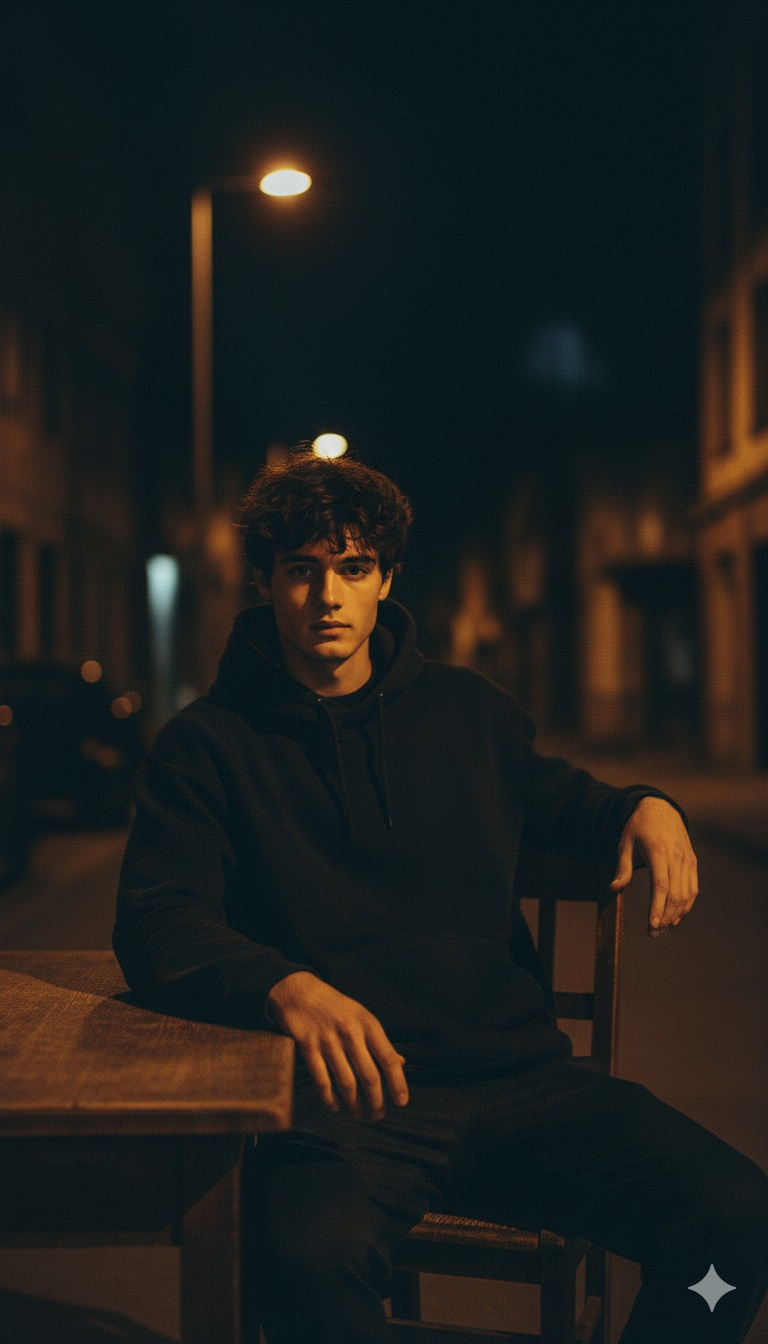
Cinematic Low-Key Streetlamp Portrait Prompt

Nano Banana Nano Banana
Cinematic Low-Key Streetlamp Portrait Prompt — AI generated image

The Prompt

Copy-Paste Prompt
Low-key portrait of a man standing under a dim streetlamp, warm light brushing the side of his face while the rest fades into deep shadow. Wind-tossed hair, steady forward gaze. Background dissolves into dark building silhouettes. Cinematic grain, razor-sharp jawline highlights, muted tones.
Subject A man with wind-tossed hair, steady forward gaze, and razor-sharp jawline highlights.
Environment Standing under a dim streetlamp with background dissolving into dark building silhouettes.
Lighting Warm light brushing the side of the face while the rest fades into deep shadow.
Style Low-key portrait with cinematic grain and muted tones.

How to Use this Nano Banana Prompt

1

Open Nano Banana

Launch the AI image tool.

2

Add Reference

Upload a photo if the prompt needs one.

3

Paste Prompt

Copy and paste the prompt above.

4

Generate

Create your AI image.

About This Cinematic Low-Key Streetlamp Portrait Prompt Prompt

This cinematic photo editing prompt generates a striking, moody low-key portrait of a man standing beneath a dim streetlamp. The visual composition relies heavily on high-contrast lighting, where warm light brushes the side of the subject's face while the rest of the frame fades naturally into deep shadow. Details like wind-tossed hair, a steady forward gaze, and razor-sharp jawline highlights add an intense emotional depth to the final output.

Creators, digital artists, and photographers who want to achieve a moody, dramatic aesthetic will find this prompt especially useful for storytelling projects. It works well for concept art, atmospheric character designs, or moody social media portfolios where high-contrast visual storytelling is required. The lack of distracting background elements keeps the viewer's focus entirely on the subject and the dramatic interplay of light and shadow.

To use this prompt effectively, simply copy the text into your preferred AI image generator that supports advanced textural and lighting descriptions. While no specific AI model is mandated by the prompt itself, models that excel at rendering fine details like cinematic grain and subtle lighting transitions will yield the most striking results. Adjusting your generation settings toward realistic rendering styles will help enhance the sharpness of the facial highlights.

When customizing the prompt, you can experiment by altering the subject's expression or the intensity of the wind-tossed hair while keeping the core lighting structure intact. Because the environment relies on dark building silhouettes and a single dim streetlamp, changing the primary light color temperature can drastically alter the emotional tone of the final image. Always maintain the core low-key contrast instructions to preserve the signature shadowy atmosphere.

This specific visual style is valuable for anyone aiming to produce professional-grade, atmospheric imagery without complicated multi-light setups. The inclusion of cinematic grain and muted tones gives the generated portrait a timeless, film-like quality that stands out in digital feeds. By focusing on minimalist background elements and strong directional lighting, this prompt delivers a focused and polished result every time.

Frequently Asked Questions

Common questions about this AI prompt and how to get the best results.

What kind of image does this prompt create?
This prompt creates a moody, low-key vertical portrait of a man standing under a dim streetlamp with dramatic shadows and warm side-lighting.
How should I use this prompt in my AI generator?
Simply copy the exact prompt text into your preferred AI image generator that supports advanced lighting and textural details.
Can I change the background of the image?
While the prompt specifies dark building silhouettes, you can experiment with minor environmental adjustments while keeping the core lighting intact.
What makes this prompt look cinematic?
The cinematic look is achieved through a combination of low-key shadows, warm directional lighting, cinematic grain, and muted color tones.
Do I need a specific AI model to run this prompt?
No specific AI model is required, but models that excel at photorealism and high-contrast lighting transitions will produce the best results.

Pro Tips for Better Results

  • Keep the low-key contrast settings high to ensure the shadows remain deep and dramatic.
  • Use an AI model that supports fine textural details to capture the cinematic grain accurately.
  • Avoid adding complex background elements to maintain focus on the subject under the streetlamp.
  • Experiment with slight variations in the color temperature of the warm light for different moods.
  • Ensure your generation aspect ratio matches vertical portrait formats to best frame the subject.
Message here



