Girl Headshot Prompt

Nano Banana Nano Banana
Girl Headshot Prompt — AI generated image

The Prompt

Copy-Paste Prompt
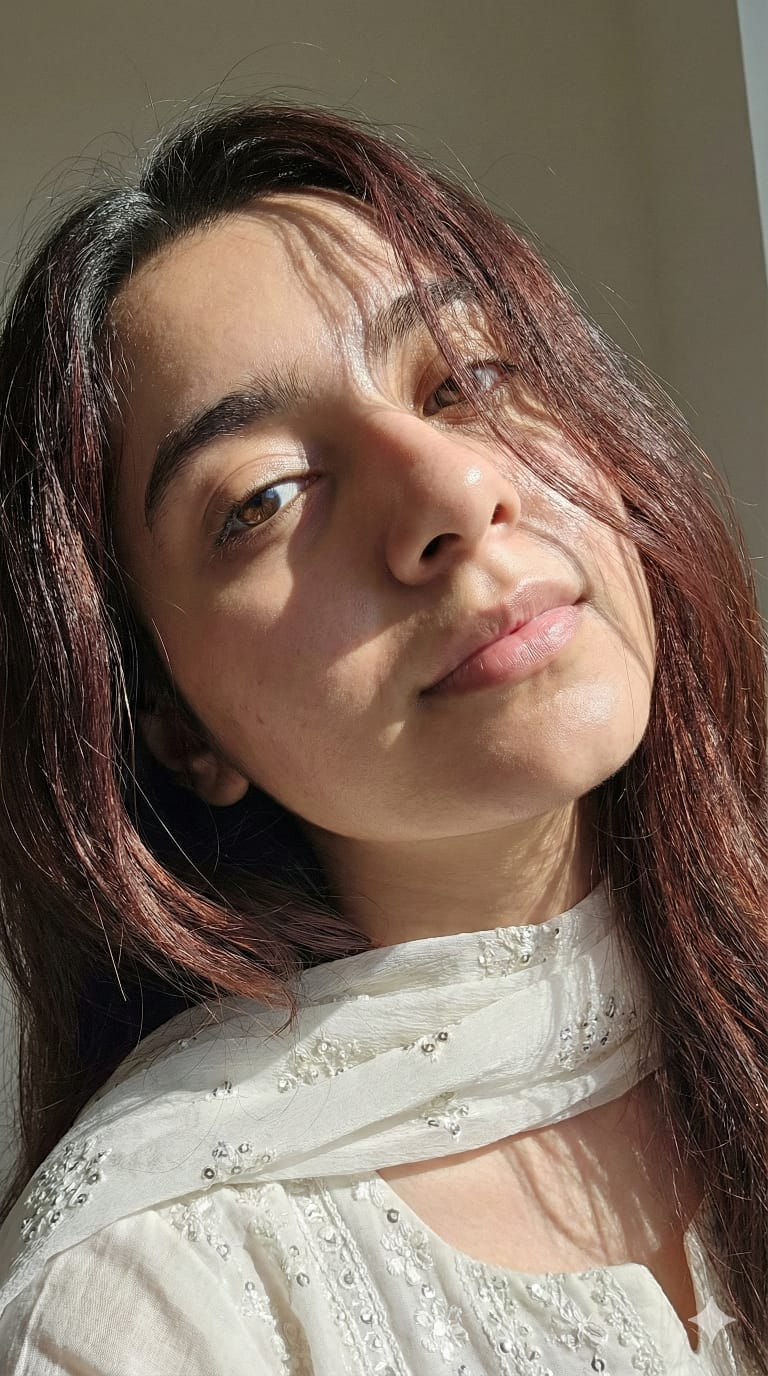
Create a Preserve the original person's identity, face, and physical features with high likeness. Do not alter their face. Apply the following style: An extremei close-up headshot, angled slightly upwards from eye-level, focusing on the subject's face from mid-forehead to just below the lips, with parts of the shoulders and collarbone visible on the lower left. Apply a slender and delicate build to the subject. The subject's head is tilted significantly towards their right (viewer's left) and slightly backward, with their gaze directed upwards and slightly to their left (viewer's right), looking directly into the camera from this tilted angle. Long, dark brown hair, with reddish-brown undertones visible in direct light, falls forward across the face in numerous strands, creating intricate shadow patterns over the eyes, nose, and forehead. The hair appears slightly textured and disheveled, yet styled to frame the face. The scene is illuminated by harsh, direct sunlight, indicative of midday The overall mood is natural, intimate, and high-contrast, conveying a fresh and direct aesthetic.she wearing a beautiful chumki dollar work three pis white colour and also a white chumki work dupatta on her Neck shoulder.”midday The overall mood is natural, intimate, and high-contrast, conveying a fresh and direct aesthetic.she wearing a beautiful chumki dollar work three pis white colour and also a white chumki work dupatta on her Neck shoulder.”
Subject A person (implied female), slender and delicate build. Extreme close-up headshot, angled slightly upwards from eye-level, focusing on the face from mid-forehead to just below the lips, with parts of shoulders and collarbone visible. Head tilted significantly, gaze directed upwards and slightly to the left, looking directly into the camera. Long, dark brown hair with reddish-brown undertones, textured and disheveled, falling across the face, creating shadow patterns. Wearing a beautiful white 'chumki dollar work three pis' and a white 'chumki work dupatta' on the neck/shoulder.
Environment Not specified, but implied outdoor or brightly lit indoor setting due to 'harsh, direct sunlight, indicative of midday'.
Lighting Harsh, direct sunlight, indicative of midday. High-contrast.
Style Extreme close-up headshot. Natural, intimate, and high-contrast, conveying a fresh and direct aesthetic. Emphasis on preserving original person's identity, face, and physical features with high likeness.

How to Use this Nano Banana Prompt

1

Open Nano Banana

Launch the AI image tool.

2

Add Reference

Upload a photo if the prompt needs one.

3

Paste Prompt

Copy and paste the prompt above.

4

Generate

Create your AI image.

About This Girl Headshot Prompt Prompt

This AI image prompt is meticulously crafted to generate a stunning, high-contrast Indian portrait, focusing on an extreme close-up headshot. It prioritizes preserving the original person's identity and facial features with remarkable likeness, ensuring the output feels authentic. The prompt details a slender subject with long, dark brown hair, featuring reddish-brown undertones, artfully falling across the face to create intricate shadow patterns. The subject is depicted wearing a beautiful white "chumki dollar work three pis" and a matching "chumki work dupatta," adding a distinct cultural and fashion element to the visual.

This detailed Indian portrait prompt is ideal for a range of users, from digital artists seeking to create diverse character concepts to fashion designers illustrating traditional attire. Content creators can utilize it for engaging social media posts or unique blog imagery. Photographers looking for inspiration in high-contrast lighting and intimate framing will find this prompt particularly useful. It's perfect for anyone aiming to produce a visually striking and culturally rich portrait that captures specific aesthetic nuances.

To use this prompt, simply copy the entire text and paste it into your preferred AI image generation tool. If your AI model supports reference images, uploading a photo of the person you wish to depict will help the AI "preserve the original person's identity, face, and physical features with high likeness" as specified. Pay attention to how the AI interprets the "chumki dollar work" attire, as some models may require slight adjustments to render intricate fabric details accurately.

Customization options for this prompt, based on its existing elements, are straightforward. While the prompt specifies "long, dark brown hair, with reddish-brown undertones," you could experiment with subtle variations in hair texture or how it "falls forward across the face." The "white chumki dollar work three pis" can be adapted by describing different "chumki" patterns or even suggesting alternative traditional Indian attire colors if you wish to explore variations while maintaining the cultural essence. You might also specify the *intensity* of the "harsh, direct sunlight" for slightly different mood effects.

The resulting high-contrast Indian portrait offers immense value for various creative and social media applications. Its intimate, direct aesthetic, combined with the detailed focus on facial features and traditional attire, creates highly engaging content. Such images stand out on platforms like Instagram, Pinterest, or cultural blogs, drawing viewers in with their unique blend of realism and artistic detail. This AI prompt for Indian portraits allows creators to explore cultural narratives and fashion through a powerful visual medium.

Frequently Asked Questions

Common questions about this AI prompt and how to get the best results.

How does this prompt ensure the subject's identity is preserved?
The prompt explicitly includes "Preserve the original person's identity, face, and physical features with high likeness. Do not alter their face." For best results, use an AI model that supports reference images and upload a photo of the person you want to depict.
What kind of clothing is generated by "chumki dollar work three pis"?
"Chumki dollar work three pis" refers to a traditional Indian three-piece outfit (often salwar kameez or similar) adorned with "chumki" (sequin) work, specifically in a "dollar" pattern, in white color. It also includes a matching white "chumki work dupatta."
Can I change the lighting from "harsh, direct sunlight"?
The prompt specifies "harsh, direct sunlight, indicative of midday" for a high-contrast look. While you can try modifying this phrase in your prompt, it might alter the overall "natural, intimate, and high-contrast" mood intended by the original prompt.
Is this prompt suitable for generating full-body images?
No, this prompt is specifically designed for an "extreme close-up headshot," focusing on the face from mid-forehead to below the lips, with only parts of the shoulders and collarbone visible. It will not generate a full-body image.
What AI models are best for this type of detailed portrait?
While no specific AI model is mentioned, prompts emphasizing "high likeness" and intricate details like hair and specific clothing often perform well on models known for photorealism and fine-tuned control over subject features, such as Midjourney, Stable Diffusion, or similar advanced generators.

Pro Tips for Better Results

  • Utilize Reference Images: For the best 'high likeness' and identity preservation, use an AI image generator that allows uploading a reference photo of the desired person.
  • Refine Hair Details: Experiment with adding more descriptive words for the hair's texture (e.g., 'silky,' 'wavy,' 'straight') or the specific way it 'falls forward' to achieve subtle variations.
  • Specify Attire Nuances: If your AI struggles with 'chumki dollar work,' try breaking it down further (e.g., 'white fabric with small, shimmering sequin embroidery in a circular pattern') or simplify the description.
  • Consider Background Simplicity: Since no environment is specified, the AI might generate a generic background. For an intimate feel, consider adding a simple, blurred background element like 'softly blurred natural foliage' or 'plain studio backdrop.'
  • Adjust Midday Light Intensity: While 'harsh, direct sunlight' is key, you can slightly adjust the intensity by adding terms like 'intense midday sun' or 'softened midday sun' to fine-tune the contrast without losing the core lighting style.
Message here