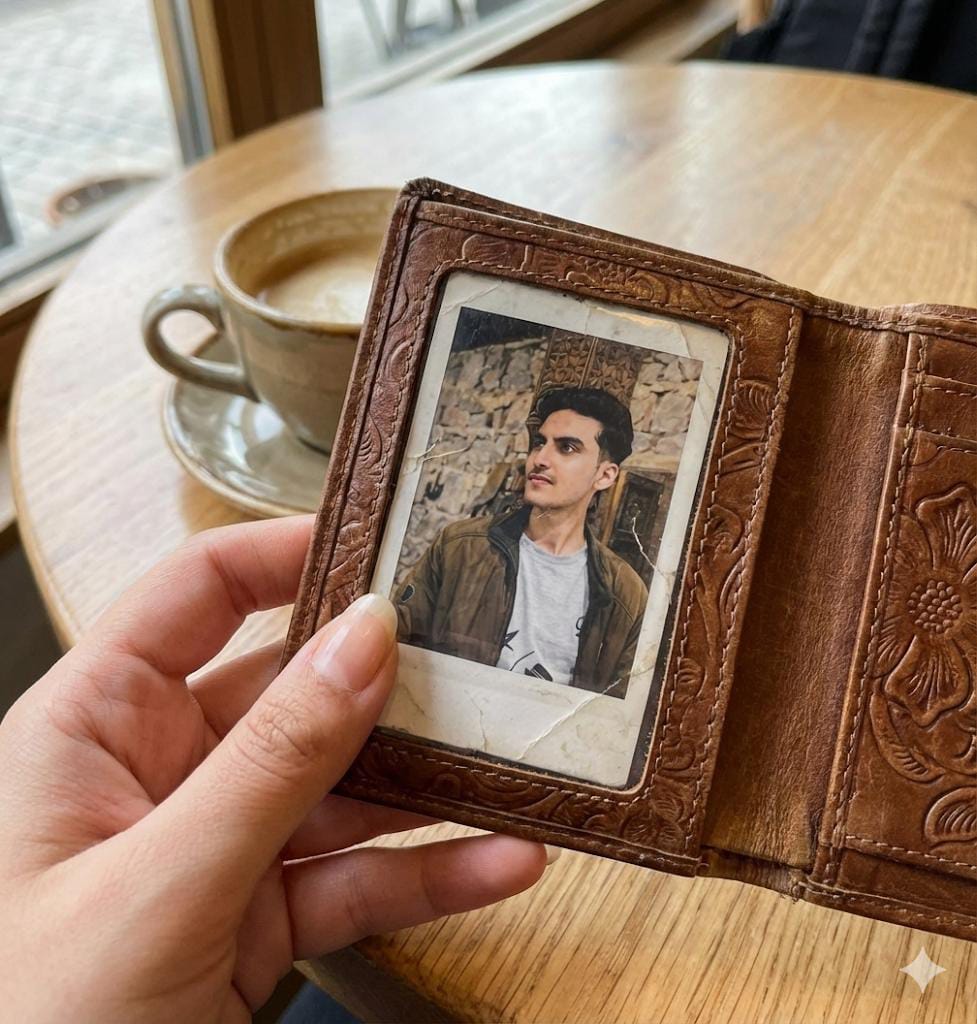
Feminine Wallet Photo Insert Scene

Nano Banana Nano Banana
Feminine Wallet Photo Insert Scene — AI generated image

The Prompt

Copy-Paste Prompt
“Create an ultra-realistic close-up of a feminine hand holding her own wallet open. Hand must look soft, natural skin texture, clean nails. The wallet should look clearly feminine — elegant design, soft leather. Inside the wallet, place a Polaroid-style printed photo of this man (use the uploaded image), perfectly fitted and slightly worn at the edges. Background should be a real-life setting like a café table or airport seat — soft depth of field, natural light, zero AI artifacts. Make it look like a real captured moment
Subject Ultra-realistic close-up of a feminine hand holding an open, elegant soft leather wallet. Inside, a perfectly fitted, slightly worn Polaroid-style photo of a man (from an uploaded image).
Environment Real-life setting like a café table or airport seat, with a soft depth of field.
Lighting Natural light.
Style Ultra-realistic, real captured moment, zero AI artifacts, soft natural skin texture, clean nails.

How to Use this Nano Banana Prompt

1

Open Nano Banana

Launch the AI image tool.

2

Add Reference

Upload a photo if the prompt needs one.

3

Paste Prompt

Copy and paste the prompt above.

4

Generate

Create your AI image.

About This Feminine Wallet Photo Insert Scene Prompt

This powerful AI prompt is designed to generate an incredibly detailed and ultra-realistic close-up image. You'll see a feminine hand delicately holding her own wallet open, revealing a perfectly integrated Polaroid-style photo of a man inside. The hand itself will exhibit soft, natural skin texture with immaculately clean nails, while the wallet is crafted with an elegant design from soft leather, clearly conveying a feminine aesthetic. The background will immerse the scene in a real-life setting, such as a cozy café table or a bustling airport seat, all rendered with a beautiful soft depth of field and illuminated by natural light, completely devoid of any distracting AI artifacts, making it look like a genuine, captured moment.

This realistic wallet photo AI prompt is ideal for a diverse range of creators seeking to infuse their digital content with a touch of personal authenticity and high fidelity. Content creators on platforms like Instagram and TikTok will find it invaluable for generating captivating lifestyle imagery that resonates deeply with their audience. Photographers can use it to visualize conceptual shots or create mock-ups for client presentations, while bloggers and storytellers can leverage these images to add a deeply personal, narrative element to their articles or social posts. Anyone looking to create unique, personalized digital keepsakes or visualize cherished memories in a hyper-realistic format will find this prompt exceptionally useful.

To begin, simply open your preferred AI image generation platform, such as ChatGPT, Google Gemini, or even Nano Banana. Copy and paste the entire AI prompt provided into the input field. Crucially, if your chosen platform supports image uploads, ensure you upload the specific image of the man you wish to appear in the Polaroid photo within the wallet; the AI will then seamlessly integrate it. Remember to specify "ultra-realistic" in your prompt to guide the AI towards a high-fidelity output. Expect the AI to render a stunning, detailed image that captures the essence of a real photograph, complete with the subtle nuances of light and texture described.

One of the strengths of this realistic wallet photo AI prompt lies in its adaptability. You can easily modify various elements to achieve different visual narratives. Consider changing the specific details of the feminine hand, perhaps adding a delicate ring or specifying a particular nail polish color to match a mood. Experiment with the wallet's design, requesting a "vintage leather wallet" or a "sleek, modern cardholder" in a specific color. The background is also a key variable; try "a sunlit wooden desk with scattered notes" or "a cozy living room armchair" to alter the scene's overall ambiance. Furthermore, you can adjust the "slightly worn at the edges" detail of the Polaroid to reflect different levels of sentimental value.

The demand for hyper-realistic AI-generated imagery, especially those depicting everyday, personal moments, continues to surge, making this realistic wallet photo AI prompt incredibly timely. Users are increasingly seeking digital assets that blur the lines between AI creation and actual photography, valuing authenticity and detail above all else. This prompt excels by focusing on specific, tangible details—like natural skin texture, elegant leather, and a perfectly integrated photo—while explicitly demanding "zero AI artifacts." This meticulous instruction helps the AI bypass common generative flaws, ensuring a truly convincing and emotionally resonant output. We encourage you to try this powerful prompt on NanoAIPrompts.com to experience its full potential.

Frequently Asked Questions

Common questions about this AI prompt and how to get the best results.

What kind of image does this AI prompt generate?
This prompt generates an ultra-realistic close-up of a feminine hand holding an elegant wallet open. Inside the wallet, you'll see a perfectly fitted, slightly worn Polaroid-style photo of a man, set against a real-life background with natural light and soft depth of field.
How can I customize the person in the Polaroid photo?
To customize the person, you must use an AI image generation tool that supports image uploads. Upload the specific photo of the man you want to appear in the Polaroid, and the AI will integrate it into the wallet scene.
Which AI tools are best for this ultra-realistic prompt?
For ultra-realistic outputs like this, AI platforms such as Google Gemini and ChatGPT (especially with DALL-E 3 integration) are highly recommended. These tools excel at generating detailed textures and complex scenes with high fidelity.
Can I change the background setting in this prompt?
Yes, you can easily customize the background setting. Instead of a 'café table or airport seat,' try specifying 'a sunlit wooden desk,' 'a blurred park bench,' or 'a cozy home interior' to alter the scene's atmosphere.
Is it possible to make the wallet look different?
Absolutely. You can modify the wallet's description to suit your vision, such as 'a minimalist black leather wallet,' 'a vibrant red vegan leather clutch,' or 'a vintage, embossed coin purse' to change its style and material.

Pro Tips for Better Results

  • Always specify "ultra-realistic" and "zero AI artifacts" for high-fidelity output.
  • Upload a clear, high-resolution image of the man for the Polaroid photo to ensure optimal integration.
  • Experiment with different real-life background settings like "wooden desk with blurred books" or "park bench with autumn leaves."
  • Vary the description of the feminine hand, such as "delicate hand with a simple silver ring" or "manicured nails with a subtle blush polish."
  • Refine the wallet's details, for instance, "a small, vintage leather wallet" or "a modern, sleek vegan leather wallet in sage green."
Message here



