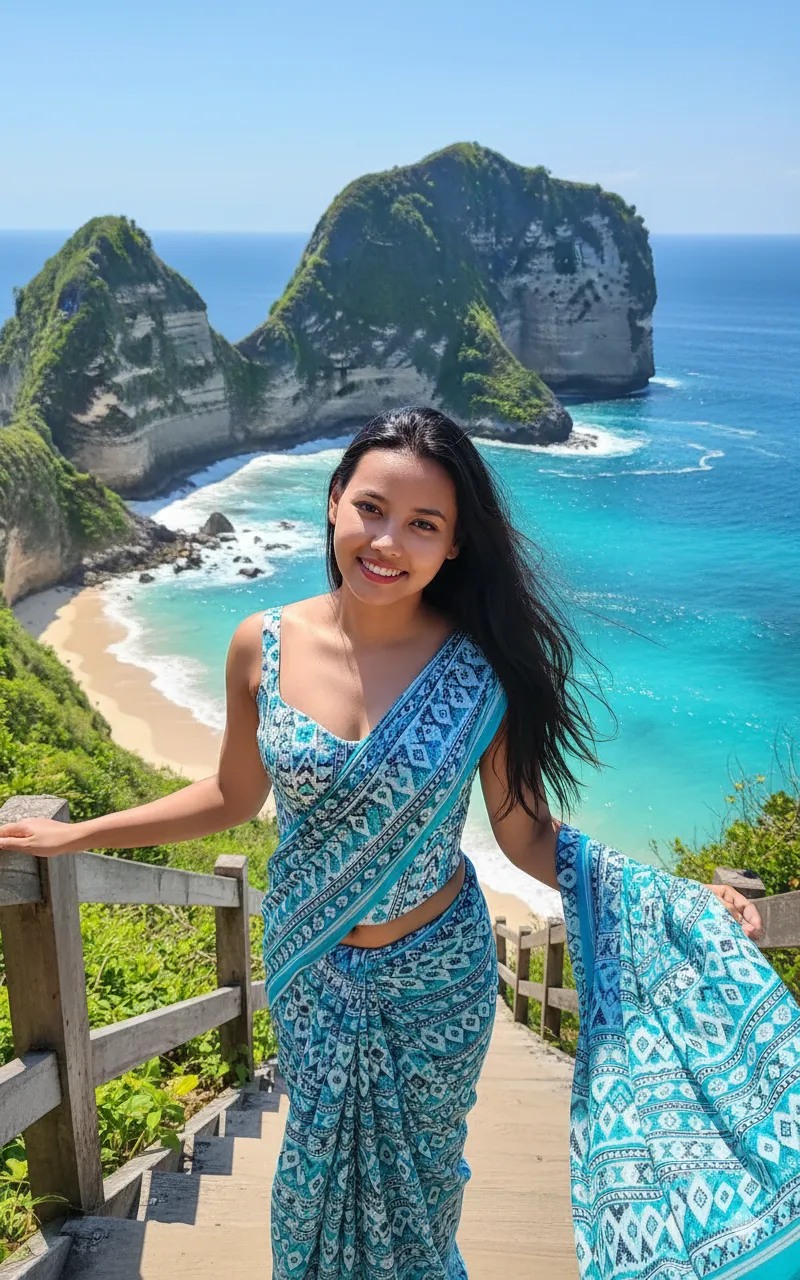
Bali Kelingking Beach Saree Portrait AI

Any Model
Bali Kelingking Beach Saree Portrait AI — AI generated image

The Prompt

Copy-Paste Prompt
Create a beautiful, close-up shot, low - angle portrait of a woman standing on wooden steps overlooking a stunning turquoise ocean. The woman has long dark hair and waring corset blouse with white -tuquoise - blue gradient saree. In the background are the iconic, steep, green-covered limestone cliffs and rock formations of Kelingking Beach, Nusa Penida, Bali, with clear blue water and white waves below. Sunny day, travel photography, vibrant colors..
Subject A woman with long dark hair, wearing a corset blouse and a white-turquoise-blue gradient saree.
Environment Wooden steps overlooking a turquoise ocean, with iconic steep green-covered limestone cliffs and rock formations of Kelingking Beach, Nusa Penida, Bali. Clear blue water and white waves below.
Lighting Sunny day.
Style Beautiful, close-up shot, low-angle portrait, travel photography, vibrant colors.

How to Use this Any Model Prompt

1

Open Any Model

Launch the AI image tool.

2

Add Reference

Upload a photo if the prompt needs one.

3

Paste Prompt

Copy and paste the prompt above.

4

Generate

Create your AI image.

About This Bali Kelingking Beach Saree Portrait AI Prompt

This Kelingking Beach AI prompt is engineered to generate a captivating, close-up, low-angle portrait of a woman set against Bali's iconic coastline. The generated image will feature a woman with long dark hair, elegantly clad in a corset blouse paired with a striking white-turquoise-blue gradient saree. She is positioned on rustic wooden steps, gazing out over the stunning turquoise expanse of the ocean. In the background, the unmistakable steep, green-covered limestone cliffs and dramatic rock formations of Kelingking Beach in Nusa Penida will be prominently displayed, complemented by clear blue water and foamy white waves below, all under a bright sunny sky with vibrant colors.

This particular Kelingking Beach AI prompt serves as an invaluable tool for a diverse range of creators and enthusiasts. Travel bloggers and Instagram influencers seeking to create aspirational content for Bali will find this extremely useful for visualizing unique travel photography concepts. Fashion enthusiasts can explore how traditional attire like a saree harmonizes with breathtaking natural backdrops, while AI artists can use it to refine their skills in generating detailed portraits and scenic landscapes. It's also perfect for anyone dreaming of a Bali getaway and wanting to visualize themselves in such a picturesque setting.

Utilizing this prompt is straightforward, making it accessible for both beginners and experienced AI users. Simply open your preferred AI image generation platform, such as ChatGPT, Gemini, or a similar tool. Paste the entire prompt into the input field. For optimal results, ensure your chosen platform is set to generate a high-quality image, and consider specifying a portrait aspect ratio (e.g., 2:3 or 9:16) if available, to emphasize the close-up nature of the shot. The AI will then process these detailed instructions to render a unique travel photograph, bringing the scene to life with stunning clarity.

Customization is key to unlocking even more creative possibilities with this Kelingking Beach AI prompt. Users can easily modify elements such as the woman's appearance, perhaps changing her hair color or styling, or experimenting with different saree color gradients or patterns to suit a specific aesthetic. Consider altering the time of day from 'sunny day' to 'golden hour' for a warmer, softer light, or even 'overcast' for a more dramatic mood. You could also adjust the camera angle or shot type, for instance, requesting a 'wide shot' to emphasize the landscape more, or changing the attire entirely to explore different fashion statements on the iconic steps.

The appeal of this prompt lies in its ability to tap into the enduring popularity of Bali as a travel destination and the growing demand for highly specific, high-quality AI-generated travel photography. Prompts like this demonstrate the power of detailed input in achieving photorealistic and visually engaging outputs, making complex scene compositions accessible to everyone. By providing clear instructions for the subject, environment, lighting, and style, the AI can produce images that resonate deeply with current visual trends. We encourage you to try this Kelingking Beach AI prompt on NanoAIPrompts.com to experience the magic of AI art firsthand and share your unique creations.

Frequently Asked Questions

Common questions about this AI prompt and how to get the best results.

What kind of image does the "Kelingking Beach AI prompt" generate?
This prompt creates a close-up, low-angle portrait of a woman on wooden steps at Bali's Kelingking Beach. She wears a corset blouse and a white-turquoise-blue gradient saree, with the iconic green cliffs and turquoise ocean forming a vibrant backdrop.
Can I change the woman's appearance or attire in this AI prompt?
Yes, you can easily customize the woman's features, such as hair color, style, or the specific colors and patterns of her saree. Simply modify the descriptive terms within the prompt to reflect your desired changes before generating the image.
Which AI image generators are best suited for this Kelingking Beach AI prompt?
This detailed prompt works exceptionally well with advanced AI image generators like ChatGPT's DALL-E integration, Google Gemini, or Midjourney. These platforms are capable of rendering complex scenes, specific attire, and detailed backgrounds with high fidelity.
How can I make the lighting different from a 'sunny day' in the generated image?
To alter the lighting, replace "Sunny day" with other descriptive terms like "golden hour," "overcast light," or "dramatic sunset." This will significantly change the mood and atmosphere of the travel photography portrait.
Is it possible to use the images generated from this prompt for commercial purposes?
The commercial use of AI-generated images depends entirely on the terms of service of the specific AI platform you are using. Always review the usage rights and licensing agreements of tools like ChatGPT or Gemini before using generated content for commercial projects.

Pro Tips for Better Results

  • Specify an aspect ratio like 2:3 or 9:16 in your AI generator settings to emphasize the portrait composition.
  • Experiment with adding an '85mm lens' or 'cinematic' style to enhance the professional photography feel.
  • Modify the saree description to include specific patterns like 'floral embroidery' or 'geometric motifs' for unique results.
  • Try changing the phrase 'wooden steps' to 'ancient stone steps' to explore different textural elements in the foreground.
  • Prompt for 'soft shadows' or 'rim lighting' to add depth and artistic flair to the woman's portrait under the sunny conditions.
Message here



