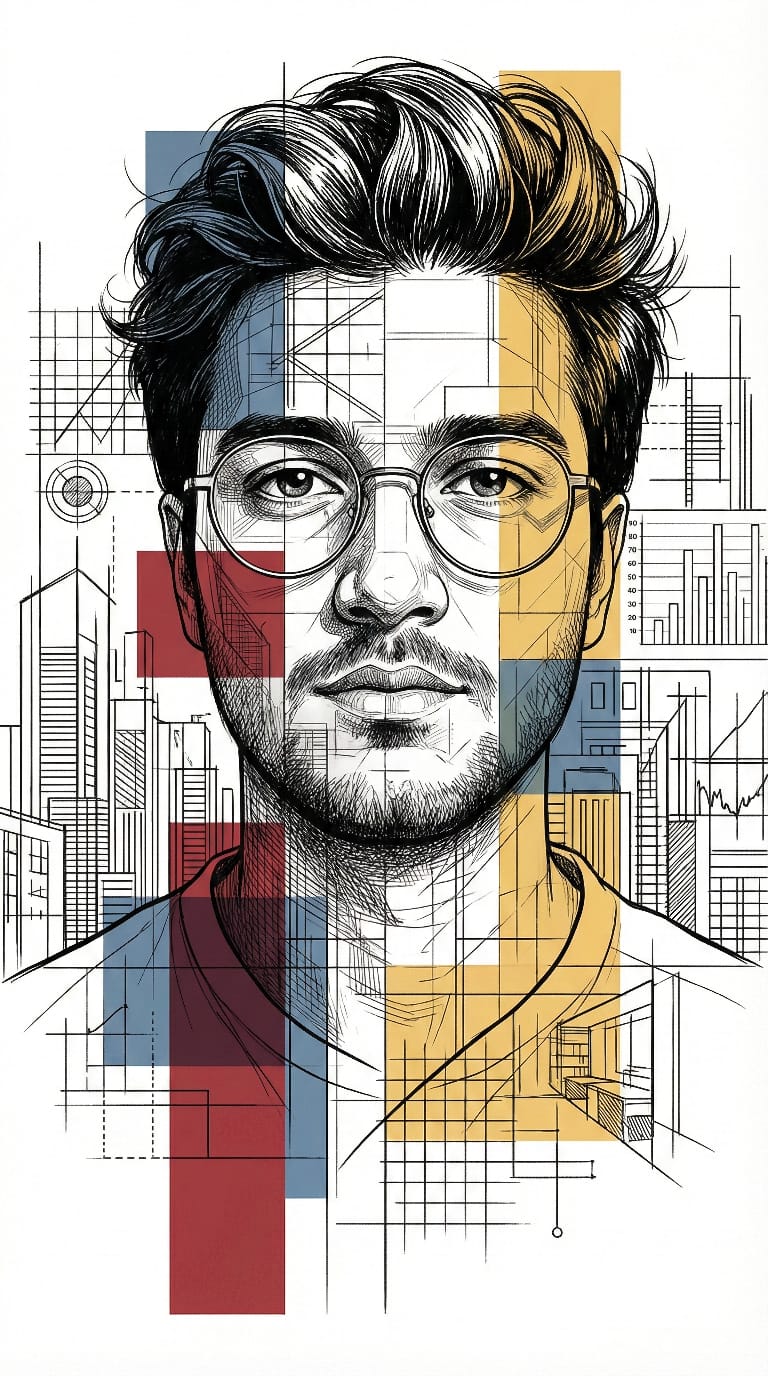
AI Art Prompt: Conceptual Portrait

Nano Banana Nano Banana
AI Art Prompt: Conceptual Portrait — AI generated image

The Prompt

Copy-Paste Prompt
{ "prompt": "Ultra-detailed stylized portrait using my face as reference. Intellectual, modernist illustration style inspired by architectural blueprints and editorial line art. Face split into layered geometric sections with visible technical diagrams, city interiors, structural grids, and abstract architectural elements embedded within the facial planes. Fine ink linework, cross-hatching, and engraving-style shading. Clean white background with dense black line drawings.\n\nBold accent colors only in selected regions: deep red, muted blue, and warm yellow, applied as flat graphic blocks and translucent overlays. Sharp, thoughtful eyes with realistic highlights, wearing thin round glasses. Minimalist yet complex composition, high contrast, crisp edges, poster-grade clarity.\n\nEditorial illustration aesthetic, conceptual portrait, futuristic intellect vibe, data visualization meets human identity. Extremely sharp, ultra-high resolution, professional magazine cover quality, no blur, no distortion, balanced symmetry.", "negative_prompt": "photorealism, soft blur, painterly strokes, oil painting, low detail, messy colors, cartoonish style, exaggerated proportions", "style": [ "modernist illustration", "architectural blueprint", "editorial line art", "engraving", "conceptual portrait", "futuristic intellect" ], "color_palette": { "accent_colors": [ "deep red", "muted blue", "warm yellow" ], "base_colors": [ "black", "white" ] }, "composition": { "background": "clean white", "symmetry": "balanced", "contrast": "high", "detail_level": "ultra-detailed", "resolution": "ultra-high" }, "quality": [ "poster-grade clarity", "professional magazine cover", "extremely sharp", "no blur", "no distortion" ] }
Subject Ultra-detailed stylized portrait using my face as reference. Intellectual, thoughtful eyes with realistic highlights, wearing thin round glasses. Face split into layered geometric sections with visible technical diagrams, city interiors, structural grids, and abstract architectural elements embedded within the facial planes.
Environment Clean white background.
Lighting Not explicitly defined; high contrast is a key visual quality.
Style Modernist illustration, architectural blueprints, editorial line art, fine ink linework, cross-hatching, engraving-style shading, conceptual portrait, futuristic intellect vibe, data visualization meets human identity.

How to Use this Nano Banana Prompt

1

Open Nano Banana

Launch the AI image tool.

2

Add Reference

Upload a photo if the prompt needs one.

3

Paste Prompt

Copy and paste the prompt above.

4

Generate

Create your AI image.

About This AI Art Prompt: Conceptual Portrait Prompt

This prompt crafts an extraordinary, ultra-detailed architectural portrait using AI, transforming a reference face into a modernist illustration. Imagine your likeness reimagined with layered geometric sections, intricate technical diagrams, city interiors, and structural grids embedded within your facial planes. The result is a high-contrast, crisp-edged image featuring fine ink linework, cross-hatching, and engraving-style shading, all set against a clean white background. This unique visual style offers a conceptual blend of data visualization and human identity.

This architectural portrait AI prompt is perfect for artists, graphic designers, or anyone seeking a distinctive digital avatar or conceptual artwork. It's ideal for creating unique profile pictures that stand out, generating striking social media content, or developing compelling imagery for personal portfolios. Individuals interested in architectural aesthetics, technical drawing, or modernist art will find this prompt especially useful for exploring new creative expressions and merging complex ideas with personal representation.

To use this prompt, simply copy the entire text and paste it into your preferred AI image generation tool. The phrase "using my face as reference" indicates that you should also upload a clear photo of the face you wish to stylize. Most advanced AI art platforms offer a feature to include a reference image, allowing the AI to interpret your features within the specified modernist and architectural framework. Ensure your reference photo is well-lit and clear for the best results in generating this unique architectural portrait.

Customization for this prompt focuses on refining the details within the specified aesthetic. You can experiment with the "bold accent colors" – deep red, muted blue, and warm yellow – by adjusting their intensity or placement within the geometric blocks. Consider specifying different types of "technical diagrams" or "abstract architectural elements" to personalize the embedded structures. While the prompt includes "thin round glasses," you can easily remove this detail by adding "no glasses" to your negative prompt if a different look is desired, ensuring the final image perfectly aligns with your vision for this stylized intellectual portrait.

The resulting architectural portrait offers a sophisticated and intellectual aesthetic highly suitable for various platforms. Its high contrast and poster-grade clarity make it visually striking for social media feeds, personal branding, or even as a unique piece of print art. The blend of modernist illustration with personal identity creates a memorable and thought-provoking image, perfect for conveying a sense of innovation and depth. This distinct visual style ensures your creative projects or online presence will capture attention and leave a lasting impression.

Frequently Asked Questions

Common questions about this AI prompt and how to get the best results.

What kind of image does this AI prompt create?
This prompt generates an ultra-detailed, stylized architectural portrait. It transforms a reference face into a modernist illustration featuring geometric sections, technical diagrams, and a high-contrast, line art aesthetic on a clean white background.
How do I use my face as a reference for this prompt?
Most AI image generators allow you to upload a reference photo. Simply include a clear, well-lit image of your face alongside this prompt, and the AI will use it to inform the stylized portrait.
Can I change the accent colors in the portrait?
Yes, the prompt specifies 'deep red, muted blue, and warm yellow.' You can modify these color names in the prompt to experiment with a different palette or adjust their intensity.
What AI model is best suited for this architectural portrait AI prompt?
While not tied to a specific model, prompts with detailed stylistic instructions like this one generally perform well on advanced text-to-image models such as Midjourney, Stable Diffusion, or DALL-E 3, which excel at interpreting complex artistic directions.
What makes this architectural portrait style unique for social media or portfolios?
Its unique blend of modernist illustration, architectural elements, and personal identity creates a highly distinctive and intellectual visual. The high contrast and professional quality make it stand out, ideal for conceptual branding or artistic showcases.

Pro Tips for Better Results

  • Use a clear, well-lit reference photo of your face for optimal AI interpretation of features.
  • Experiment with different combinations or intensities of the deep red, muted blue, and warm yellow accent colors.
  • Refine the prompt by specifying particular types of technical diagrams or architectural elements you wish to see embedded.
  • If you prefer the portrait without glasses, add 'no glasses' to your negative prompt for a cleaner look.
  • Test various aspect ratios (e.g., 1:1, 9:16) to see how the geometric composition adapts and frames the portrait.
Message here



