ChatGPT Fashion Photo Prompt

Any Model
ChatGPT Fashion Photo Prompt — AI generated image

The Prompt

Copy-Paste Prompt
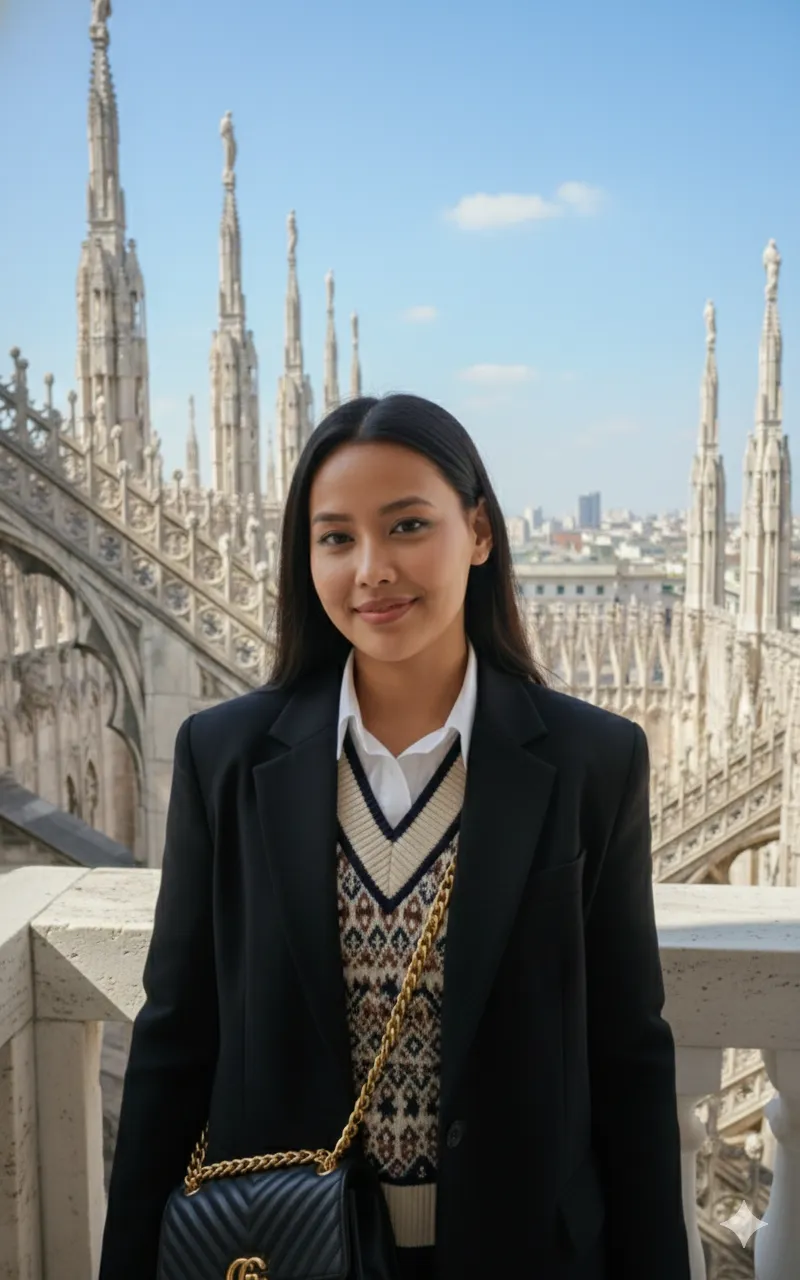
Create a stylish young woman with long, dark black hair smiling while standing on the ornate stone rooftop of a historic European cathedral (like the Duomo di Milano). She is wearing a black oversized blazer over a collared shirt and a patterned sweater/vest, and carrying a black quilted shoulder bag with a gold chain strap. The background features intricate Gothic architecture, including spires and arches, with a view of the city skyline under a clear, Own Prompt bright blue sky with some wispy clouds. Bright, sunny daylight, focusing on the architectural detail and the subject's soft smile. Use my uploaded image.
Subject A stylish young woman with long, dark black hair, wearing an oversized black blazer, collared shirt, patterned sweater/vest, and carrying a black quilted shoulder bag with a gold chain strap.
Environment The ornate stone rooftop of a historic European cathedral featuring intricate Gothic architecture, spires, arches, and a distant city skyline under a clear blue sky with wispy clouds.
Lighting Bright, sunny daylight emphasizing architectural details and a soft smile.
Style Photorealistic travel and fashion editorial photography.

How to Use this Any Model Prompt

1

Open Any Model

Launch the AI image tool.

2

Add Reference

Upload a photo if the prompt needs one.

3

Paste Prompt

Copy and paste the prompt above.

4

Generate

Create your AI image.

About This ChatGPT Fashion Photo Prompt Prompt

This carefully crafted ChatGPT fashion photo prompt enables users to generate a sophisticated image of a stylish young woman standing on the ornate stone rooftop of a historic European cathedral. The prompt carefully balances detailed subject attributes, such as an oversized black blazer, layered patterned vest, and quilted shoulder bag, with a magnificent backdrop of intricate Gothic architecture and a clear city skyline.

Designed primarily for content creators, fashion enthusiasts, and digital artists, this prompt serves as an excellent resource for anyone wanting to place a reference subject into a stunning travel and architectural environment. It bridges the gap between personal photo integration and high-end editorial aesthetics without requiring complex digital manipulation skills.

To achieve the best results with this ChatGPT fashion photo prompt, simply upload your reference image to the AI chat interface alongside the provided text. Ensure your uploaded photo clearly shows the subject's face and features so the AI can maintain consistency while seamlessly blending them into the European rooftop setting under bright daylight.

Customization options are straightforward and rely entirely on the elements present in the source prompt. You can adjust clothing layers, swap out accessories like the shoulder bag, or specify different historic European architectural landmarks while keeping the core composition intact for varied editorial looks.

Ultimately, this visual style is exceptionally useful for social media portfolios, travel blogs, and fashion mood boards. The combination of sharp architectural details, sunny daylight, and a natural smiling subject creates an engaging, professional-grade image suited for modern digital platforms.

Frequently Asked Questions

Common questions about this AI prompt and how to get the best results.

Which AI model is this prompt designed for?
This prompt is specifically optimized for ChatGPT with image upload capabilities, allowing you to incorporate your own reference image into the generated scene.
Do I need to upload a reference image to use this prompt?
Yes, the prompt concludes with the instruction to use your uploaded image to maintain consistency with your specific subject.
Can I change the clothing described in the prompt?
You can modify the clothing descriptions in the prompt to match different outfits while keeping the historic cathedral rooftop setting.
What kind of background does this prompt create?
It generates an intricate Gothic architecture background featuring cathedral spires, stone arches, and a distant city skyline under a clear blue sky.
How can I ensure the facial features of my uploaded image are retained?
Use a well-lit, front-facing reference photo and explicitly remind the AI in your instructions to closely match the face from the uploaded file.

Pro Tips for Better Results

  • Upload a clear, high-resolution reference photo of the subject's face to ensure accurate facial preservation during generation.
  • Keep the clothing descriptions intact in the prompt if you want to maintain the specific layered fashion aesthetic.
  • Specify the exact European cathedral name if you wish to change the background architecture from the default Duomo di Milano style.
  • Ensure your ChatGPT settings allow for image uploads and reference adherence before running the generation.
  • Adjust the time of day descriptor if you want to experiment with softer golden hour lighting instead of bright midday sun.
Message here



