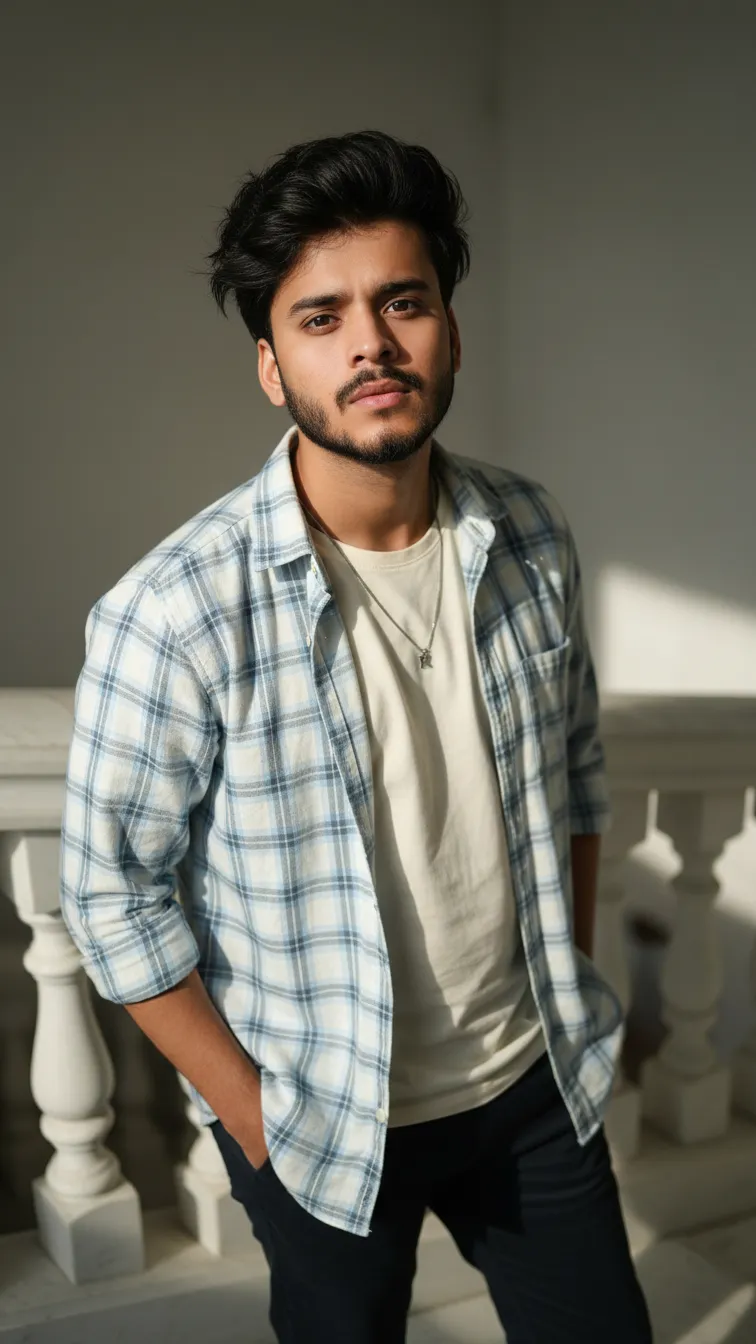
8K High-Angle Fashion: Man on Marble Stairs

Any Model
8K High-Angle Fashion: Man on Marble Stairs — AI generated image

The Prompt

Copy-Paste Prompt
HIGH-ANGLE FASHION, 8K HALF BODY CLOSE UP PORTRAIT OF A 20 YEARS MAN, WITH THE SAME FACIAL FEATURES AS THE MAN IN THE REFERENCE PHOTO, DARK MESSY STYLE HAIR. BOTH HANDS IN POCKET AND STANDING CASUALLY ON A WHITE MARBLE STAIRCASE BANISTER. HE IS WEARING AN LIGHT BLUE AND WHITE PLAID ROLLED UP SHIRT OVER A CREAM T-SHIRT AND A SILVER NECKLACE, CASTING DRAMATIC, SHARP SHADOW ON THE MARBLE STAIRS AND BALUSTERS
Subject A 20 years man with dark messy style hair, wearing a light blue and white plaid rolled up shirt over a cream t-shirt and a silver necklace, with both hands in pockets.
Environment Standing casually on a white marble staircase banister.
Lighting Casting dramatic, sharp shadow on the marble stairs and balusters.
Style High-angle fashion, 8k half body close up portrait.

How to Use this Any Model Prompt

1

Open Any Model

Launch the AI image tool.

2

Add Reference

Upload a photo if the prompt needs one.

3

Paste Prompt

Copy and paste the prompt above.

4

Generate

Create your AI image.

About This 8K High-Angle Fashion: Man on Marble Stairs Prompt

This specialized fashion portrait prompt is designed to help creators generate a striking half-body close-up of a twenty-year-old man from a high-angle perspective. By focusing on specific styling details like a light blue and white plaid rolled-up shirt over a cream t-shirt, a silver necklace, and dark messy style hair, the prompt establishes a distinct casual look. It also incorporates posture details, placing both hands in pockets while standing casually on a white marble staircase banister.

Ideal for fashion enthusiasts, digital artists, and creators experimenting with AI image generators, this prompt provides a clear structural framework for portrait generation. It is particularly useful for workflows that require consistency with a specific facial structure through a reference photo. Users can easily adapt the aesthetic for social media portfolios, style lookbooks, or personal creative projects without needing complex prompt engineering from scratch.

To achieve the best results with this prompt, input it into your preferred AI image generator that supports reference photo uploads. Ensure you upload a clear source image matching the facial features required for the generation. Review your generator settings to confirm that clothing, posture, and environmental descriptions align with your intended output before running the final generation pass.

When customizing this prompt, you can adjust specific elements while retaining the core composition. Modify the clothing colors or shirt patterns if you want to experiment with different seasonal wardrobes, or alter the jewelry description to match alternate accessories. However, keep the high-angle perspective, marble staircase environment, and hand placement instructions intact to preserve the original architectural composition and dramatic framing.

This specific visual style leverages sharp, directional lighting to create high-contrast shadows across the marble stairs and balusters, adding depth and architectural interest to the final image. Such dramatic lighting techniques elevate standard portraits into striking fashion editorials, making the resulting images highly effective for mood boards, digital lookbooks, and modern creative showcases.

Frequently Asked Questions

Common questions about this AI prompt and how to get the best results.

What kind of image does this prompt create?
It creates a high-angle, half-body close-up fashion portrait of a man standing on a white marble staircase banister with dramatic shadows.
Do I need a reference photo to use this prompt?
Yes, the prompt relies on matching the facial features of the man in your supplied reference photo.
Can I change the clothing in the prompt?
You can modify the clothing descriptions, such as the shirt colors or layering, to fit your desired aesthetic while keeping the rest of the composition.
What makes the lighting look dramatic in the generated image?
The prompt specifically instructs the AI to cast sharp, dramatic shadows on the marble stairs and balusters from an overhead angle.
How should I format this prompt for my AI generator?
Copy the exact prompt text and paste it into your AI image generator alongside your chosen reference photo upload.

Pro Tips for Better Results

  • Upload a clear, front-facing reference photo to ensure the generated man matches your required facial features accurately.
  • Keep the high-angle perspective instruction in the prompt to maintain the distinctive overhead framing.
  • Adjust the shirt colors in the prompt if you want to experiment with different casual apparel combinations.
  • Ensure your AI model supports image-to-image or reference photo inputs for consistency.
  • Retain the mention of dramatic shadows to preserve the high-contrast lighting effect on the marble stairs.
Message here



