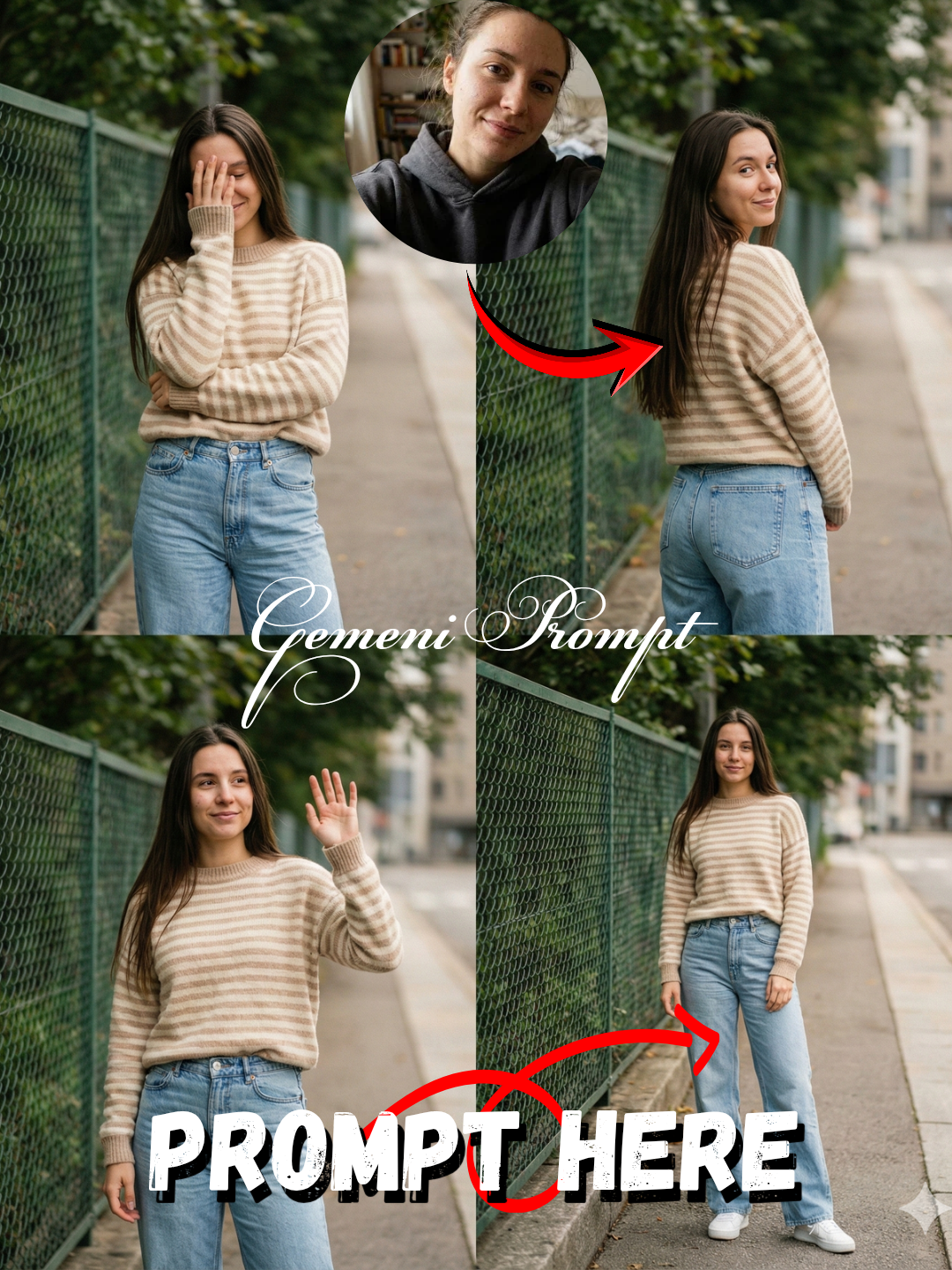
AI Fashion Photo Editing Prompt: Urban Street Style

Nano Banana Nano Banana
AI Fashion Photo Editing Prompt: Urban Street Style — AI generated image

The Prompt

Copy-Paste Prompt
Transform this image [UPLOAD YOUR IMAGE]into a 64K DSLR shot resolution of A aesthetic lifestyle fashion photoshoot featuring a young woman (same face as the uploaded image)standing on a quiet urban street beside a green chain-link fence and leafy trees. She is wearing a soft beige-and-cream striped knit sweater with long sleeves, high-waisted light blue wide-leg denim jeans, and clean white sneakers. Her long, straight darhair flows naturally, slightly windswept.The subject (same face as the uploaded image) poses casually and playfully across multiple frames-covering her face shyly with one hand, looking away, waving gently, and standing relaxed with subtle movement-creating a candid, carefree mood. The setting feels calm and nostalgic, with muted greenery, a concrete sidewalk, and an understated city background. Shot in natural daylight with soft, diffused lighting, no harsh shadows. The palette is warm and slightly desaturated, gjiving a vintage film aesthetic. Textures are visible in the denim and knit fabric, emphasizing realism. Camera angles vary between full-body shots, mid-shots, and a low-angle perspective that emphasizes the jeans and casual stance. Shallow depth of field with gentle background blur. Editorial street-style photography vibe, authentic, minimalistic, cozy, and effortlessly sty/lish. Film grain, cinematic tones, Instagram aesthetic,resolution, sharp focus, realistic skin texture. Style tags:- street fashion, candid portrait vintage aesthetic, soft tones, lifestyle photography, natural poses, minimal makeup, cozy outfit, urban nature backdrop, editorial look. Aspect ratio: 4:5 or square Quality: ultra-high resolution, photorealistic Octane render & Unreal Engine 5.
Subject Young woman (same face as uploaded image), long, straight dark hair, posing casually and playfully.
Environment Quiet urban street, green chain-link fence, leafy trees, concrete sidewalk, understated city background.
Lighting Natural daylight, soft, diffused lighting, no harsh shadows.
Style Aesthetic lifestyle fashion photoshoot, candid, carefree, calm, nostalgic, muted greenery, warm/slightly desaturated palette, vintage film aesthetic, editorial street-style photography, authentic, minimalistic, cozy, effortlessly stylish, film grain, cinematic tones, Instagram aesthetic, photorealistic Octane render & Unreal Engine 5, 64K DSLR shot resolution, shallow depth of field with gentle background blur, sharp focus, realistic skin texture.

How to Use this Nano Banana Prompt

1

Open Nano Banana

Launch the AI image tool.

2

Add Reference

Upload a photo if the prompt needs one.

3

Paste Prompt

Copy and paste the prompt above.

4

Generate

Create your AI image.

About This AI Fashion Photo Editing Prompt: Urban Street Style Prompt

This AI fashion photo editing prompt is designed to transform an existing image into a stunning, photorealistic street-style photograph. It meticulously details a young woman in a cozy, effortlessly stylish outfit—a beige-and-cream striped knit sweater, high-waisted light blue wide-leg denim jeans, and white sneakers—captured on a quiet urban street. The output emphasizes a candid, carefree mood with a nostalgic, vintage film aesthetic, making it perfect for creating high-quality, editorial-style imagery from your uploaded reference.

This prompt is ideal for content creators, fashion enthusiasts, social media influencers, and aspiring photographers seeking to elevate their visual content. Whether you're curating an Instagram feed, building a portfolio, or simply experimenting with AI art, this prompt provides a robust framework for generating professional-grade fashion photography. It’s particularly useful for those who have a specific subject image and want to apply a distinct, high-end street style AI prompt to it without needing a live photoshoot.

To use this AI fashion photo editing prompt, simply input the entire text into your preferred AI image generation tool that supports image-to-image transformation. Crucially, upload your desired reference image of a young woman where the prompt specifies "[UPLOAD YOUR IMAGE]". The AI will then leverage your uploaded photo to maintain facial fidelity while applying all the detailed stylistic and environmental elements described, resulting in a unique, transformed image that aligns with the desired aesthetic.

Customization is straightforward and potent with this AI fashion photo editing prompt. You can subtly alter the color palette within the specified beige, cream, and light blue tones, or experiment with different knit patterns for the sweater. Adjusting the descriptions of the urban street elements—like specifying different types of leafy trees or architectural details—can vary the backdrop. You can also emphasize particular poses or camera angles mentioned, such as "low-angle perspective emphasizing jeans" or "full-body shot," to guide the AI's composition.

The resulting images from this prompt are highly versatile and visually appealing for various platforms. The candid, effortlessly stylish, and vintage film aesthetic resonates strongly with current trends on social media, making it perfect for Instagram aesthetic posts. Its photorealistic quality and editorial street-style photography vibe also make it suitable for fashion blogs, online lookbooks, or personal creative projects, offering a polished yet authentic feel that captures attention and conveys a sense of genuine style.

Frequently Asked Questions

Common questions about this AI prompt and how to get the best results.

What kind of image should I upload for this AI fashion photo editing prompt?
You should upload a clear image of a young woman's face or full figure. The prompt is designed to maintain the uploaded subject's likeness while transforming the style and setting.
Can I change the outfit details in the prompt?
Yes, you can modify the colors or specific items like the sweater or jeans. However, it's recommended to keep the overall 'cozy,' 'effortlessly stylish,' and 'street style' aesthetic consistent with the prompt's intent for best results.
What AI models are best suited for this 'transform image' prompt?
While not model-specific, prompts that support image-to-image transformation or provide detailed control over uploaded reference images, such as Midjourney's 'remix' mode or Stable Diffusion with control nets, are ideal.
How does this prompt achieve a 'vintage film aesthetic'?
The prompt achieves this by specifying soft, diffused natural lighting, a warm and slightly desaturated color palette, and explicitly requesting 'film grain' and 'cinematic tones' to evoke a nostalgic, retro feel.
What aspect ratios are recommended for the output images?
The prompt specifically suggests using a 4:5 or square aspect ratio. These dimensions are particularly well-suited for social media platforms like Instagram, enhancing the 'Instagram aesthetic' mentioned.

Pro Tips for Better Results

  • Experiment with the uploaded image's original pose to influence the AI's output, aligning with the prompt's candid mood.
  • Adjust the 'beige-and-cream' or 'light blue' descriptors to fine-tune color variations for the sweater and jeans.
  • Specify different 'urban street' elements like architectural styles or types of greenery if you wish to vary the background details.
  • Emphasize 'more film grain' or 'stronger desaturation' within the prompt for a more pronounced vintage film aesthetic.
  • Try different camera angles like 'extreme low-angle' or 'close-up mid-shot' within the prompt to focus on specific elements like the jeans or sweater.
Message here



