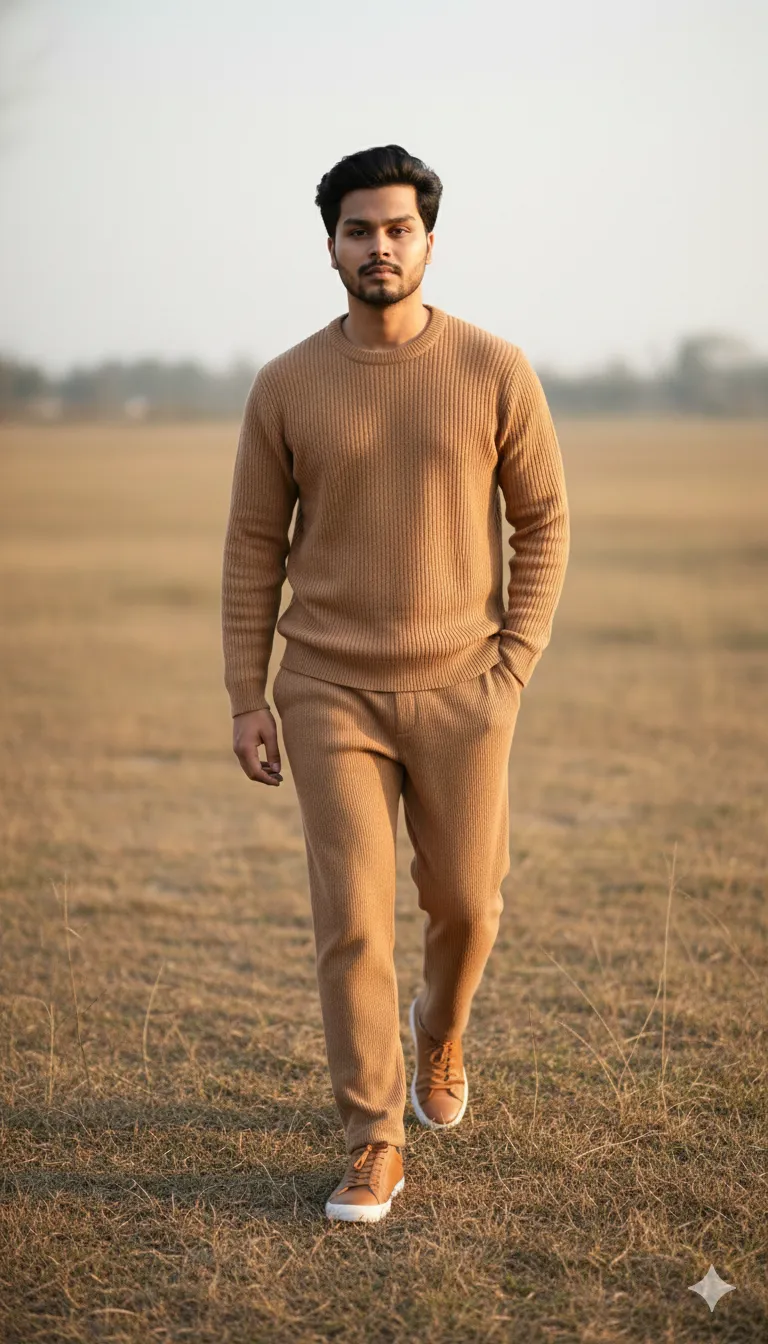
Ultra-Realistic Field Walk Portrait

Nano Banana Nano Banana
Ultra-Realistic Field Walk Portrait — AI generated image

The Prompt

Copy-Paste Prompt
Use the provided photo for 100% facial accuracy — create an ultra-realistic full-body portrait of the man walking toward the camera in a dry grassy field, wearing a camel ribbed knit sweater, matching camel ribbed trousers, and tan sneakers. Left hand in pocket, right arm relaxed holding one cricket ball. Trimmed beard, swept-back hair, warm natural sunlight, shallow depth of field, cinematic 35mm look. Use my picture for reference.
Subject A man walking toward the camera, trimmed beard, swept-back hair, left hand in pocket, right arm relaxed holding one cricket ball, wearing a camel ribbed knit sweater, matching camel ribbed trousers, and tan sneakers.
Environment Dry grassy field.
Lighting Warm natural sunlight, shallow depth of field.
Style Ultra-realistic, full-body portrait, cinematic 35mm look.

How to Use this Nano Banana Prompt

1

Open Nano Banana

Launch the AI image tool.

2

Add Reference

Upload a photo if the prompt needs one.

3

Paste Prompt

Copy and paste the prompt above.

4

Generate

Create your AI image.

About This Ultra-Realistic Field Walk Portrait Prompt

This powerful AI image prompt is engineered to generate an ultra-realistic full-body portrait of a man, meticulously detailed to capture every nuance. The generated image will feature the subject walking purposefully toward the camera, set against the natural backdrop of a dry grassy field. He will be depicted wearing a stylish camel ribbed knit sweater, perfectly complemented by matching camel ribbed trousers and practical tan sneakers. Further details include his left hand casually placed in his pocket, while his right arm is relaxed, holding a single cricket ball, all under the soft glow of warm natural sunlight with a cinematic 35mm look and shallow depth of field.

Content creators and digital artists looking to produce high-fidelity character renders will find this ultra-realistic man portrait AI prompt exceptionally useful. It's ideal for those who need consistent character representation across various projects, from social media campaigns to digital storytelling. Photographers can also leverage this prompt to visualize complex poses and lighting scenarios before a real shoot, saving time and resources. Furthermore, fashion designers or stylists can use it to preview how specific outfits, like the described camel ribbed knit set, appear in a natural, dynamic setting.

To begin generating your custom image, first open your preferred AI image generation platform, such as ChatGPT or Google Gemini, ensuring you have access to their image creation capabilities. Next, copy and paste the entire provided AI image prompt directly into the input field. If your chosen platform supports it, upload your reference photo for 100% facial accuracy before initiating the generation process, as indicated in the prompt itself. Always ensure your settings are configured for a high-quality output to fully capture the 'ultra-realistic' and 'cinematic 35mm look' aspects. You should expect a detailed, full-body portrait that closely matches the described visual elements and facial features.

Consider altering elements within this ultra-realistic man portrait AI prompt to achieve diverse visual outcomes. You could experiment with different clothing styles or colors, such as swapping the 'camel ribbed knit sweater' for a denim jacket or a different hue of trousers. Adjusting the environment from a 'dry grassy field' to a 'city street' or 'forest path' will dramatically change the mood and context of the portrait. Furthermore, changing the object in his hand, perhaps to a book or a coffee cup, can introduce new narrative possibilities, allowing for endless creative variations while maintaining the core realistic aesthetic.

The demand for ultra-realistic character generation, especially for full-body portraits, is a significant trend within the AI image community, driven by advancements in generative models. This particular prompt excels because it combines precise descriptive elements for clothing, pose, and environment with advanced photographic terminology like 'shallow depth of field' and 'cinematic 35mm look.' Such detailed instructions guide the AI effectively, ensuring a high-quality, professional-looking output that resonates with current visual aesthetics. We encourage you to try this AI image prompt on NanoAIPrompts.com to experience its power firsthand and elevate your digital creations.

Frequently Asked Questions

Common questions about this AI prompt and how to get the best results.

How can I ensure 100% facial accuracy with this AI prompt?
To achieve precise facial accuracy, ensure your AI platform supports image uploads for reference. You must provide a clear, well-lit photo of the desired face alongside this prompt, explicitly instructing the AI to use it.
What kind of clothing details can I change in this prompt?
You can modify all clothing elements, including the type of sweater, trousers, and sneakers. Experiment with different fabrics, colors, and styles, such as 'denim shirt' or 'leather boots,' to customize the character's attire.
Which AI tools are best for generating images with this prompt?
This prompt is highly effective with advanced AI image generators like ChatGPT (with DALL-E 3) or Google Gemini. These platforms excel at interpreting complex textual descriptions and integrating reference images for facial accuracy.
Can I change the setting from a dry grassy field to something else?
Absolutely, the 'dry grassy field' can be easily swapped for any environment you desire. Try descriptions like 'urban cityscape,' 'dense forest trail,' or 'sandy beach' to create entirely different backdrops for the portrait.
What does 'cinematic 35mm look' mean in an AI prompt?
A 'cinematic 35mm look' instructs the AI to emulate the aesthetic of film photography, often characterized by subtle grain, rich colors, and a specific depth of field. This enhances the realism and professional quality of the generated image.

Pro Tips for Better Results

  • Always upload a clear, high-resolution reference photo for the '100% facial accuracy' feature to work optimally.
  • Experiment with different times of day, like 'golden hour sunlight' or 'overcast light,' to alter the mood of the scene.
  • Modify the man's attire to suit various fashion styles, such as 'denim jacket and dark jeans' for a casual look.
  • Vary the object he holds, replacing the 'cricket ball' with items like a 'vintage camera' or 'notebook' to suggest different narratives.
  • Adjust the environment description to 'rolling hills' or 'desert landscape' to explore diverse natural backdrops.
Message here



