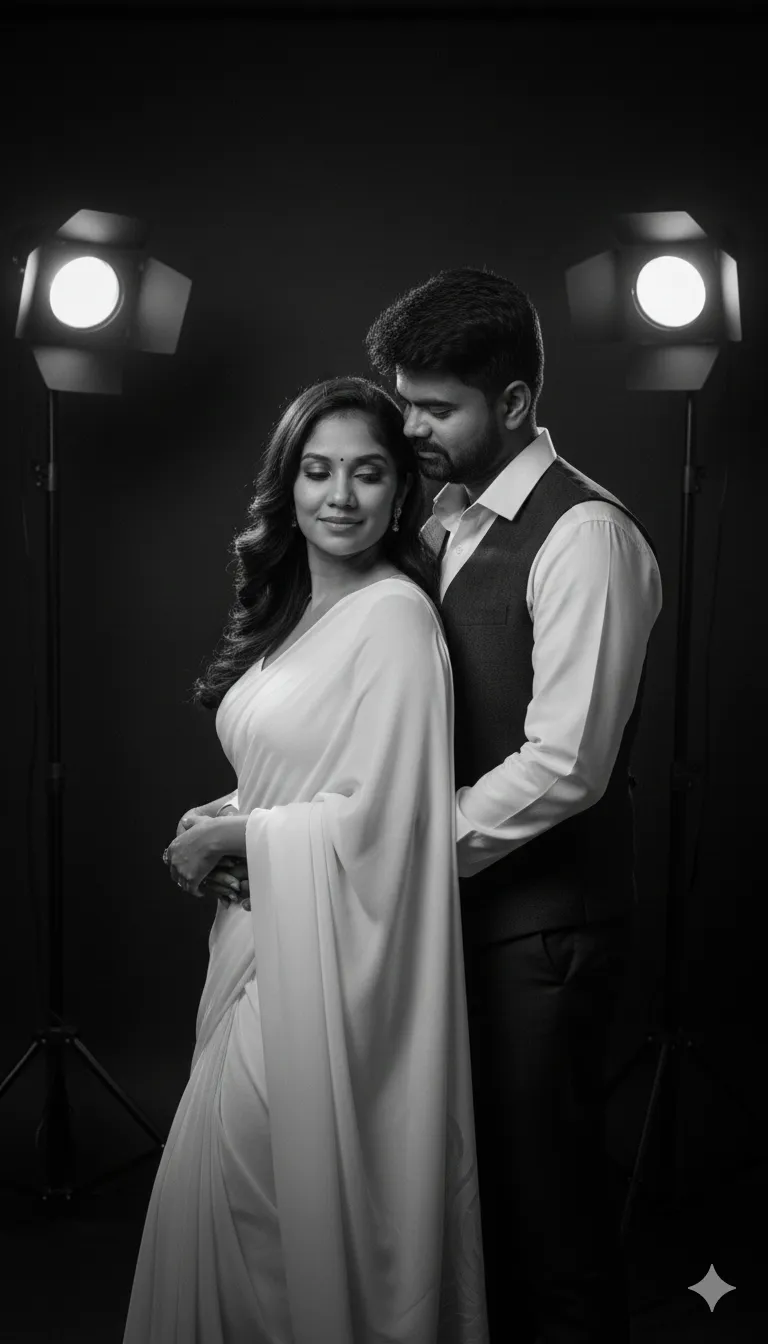
The Prompt
How to Use this Nano Banana Prompt
Open Nano Banana
Launch the AI image tool.
Add Reference
Upload a photo if the prompt needs one.
Paste Prompt
Copy and paste the prompt above.
Generate
Create your AI image.
About This Ultra-Realistic B&W Studio Couple Portrait Prompt
This AI prompt is expertly crafted to generate an ultra-realistic black and white portrait of a couple, set within a sophisticated studio environment. The resulting image will feature a dramatic dark ambiance, accentuated by two precisely placed back spotlights that create striking highlights and shadows. The female subject will be elegantly dressed in a white saree, complemented by a stylish hairstyle and refined makeup, while her male counterpart will wear a formal shirt and pants. Both figures are captured in a tender, romantic pose, intentionally positioned so they are not looking directly at the camera, adding an intimate and timeless quality to the scene.
Content creators seeking high-quality, emotionally resonant visuals will find this black and white couple portrait AI prompt exceptionally useful for their projects. Professional photographers looking for inspiration or quick mock-ups of studio concepts can leverage this prompt to visualize complex lighting and posing scenarios without extensive setup. Instagram users and social media influencers aiming to curate a sophisticated aesthetic for their couple-themed content will also benefit immensely. Furthermore, this prompt is ideal for digital artists and graphic designers who need specific, high-fidelity imagery for mood boards, album covers, or editorial illustrations.
To begin generating your stunning image, simply open your preferred AI image generation tool, such as ChatGPT's DALL-E 3 integration or Google Gemini. Carefully copy and paste the entire prompt into the text input field. While the prompt specifies "keep faces unchanged," for a text-to-image model, this means the AI will generate faces consistent with the described style and pose. If your tool supports image-to-image generation, you could upload a reference photo for facial consistency, though the prompt itself is robust enough for standalone text generation. Ensure your model's settings are optimized for "ultra-realistic" output, if available, to achieve the desired fidelity.
Many elements within this black and white couple portrait AI prompt can be easily modified to achieve diverse results. Experiment with changing the girl's attire to a different traditional garment like a lehenga or a modern gown, or alter the guy's outfit to a suit or traditional Indian wear. You can adjust the lighting by specifying "single spotlight" or "rim lighting" instead of "two back spotlights" to dramatically shift the mood. Explore different romantic poses, such as a gentle embrace or a shared gaze away from the viewer, to convey varied emotions. Adding descriptors like "vintage" or "modern" can also influence the overall aesthetic and detail of the final image.
The enduring appeal of black and white photography, particularly for portraits, lies in its ability to strip away distractions and emphasize emotion, form, and texture, making this black and white couple portrait AI prompt highly effective. This classic aesthetic is experiencing a resurgence in digital art and social media, celebrated for its timeless elegance and dramatic impact. AI image generators excel at interpreting such detailed descriptions, transforming textual cues into visually rich compositions that capture specific moods and styles. By utilizing this prompt on platforms like NanoAIPrompts.com, users can effortlessly tap into current visual trends and produce high-quality, shareable content that resonates with a broad audience.
Frequently Asked Questions
Common questions about this AI prompt and how to get the best results.
Pro Tips for Better Results
- To enhance realism, specify camera lens details like "85mm prime lens" or "f/1.8 aperture" within the prompt.
- Experiment with varying the "dark ambience" by adding phrases like "subtle smoke effect" or "minimalist background" for different moods.
- If using an image-to-image model, upload a clear reference photo of the couple's faces to ensure the "faces unchanged" instruction is effectively applied.
- Modify the "romantic pose" description with specific actions like "gentle hand-holding" or "forehead kiss" to guide the AI's composition.
- Test different formal wear descriptions for the guy, such as "tuxedo" or "three-piece suit," to see how it alters the overall elegance.



