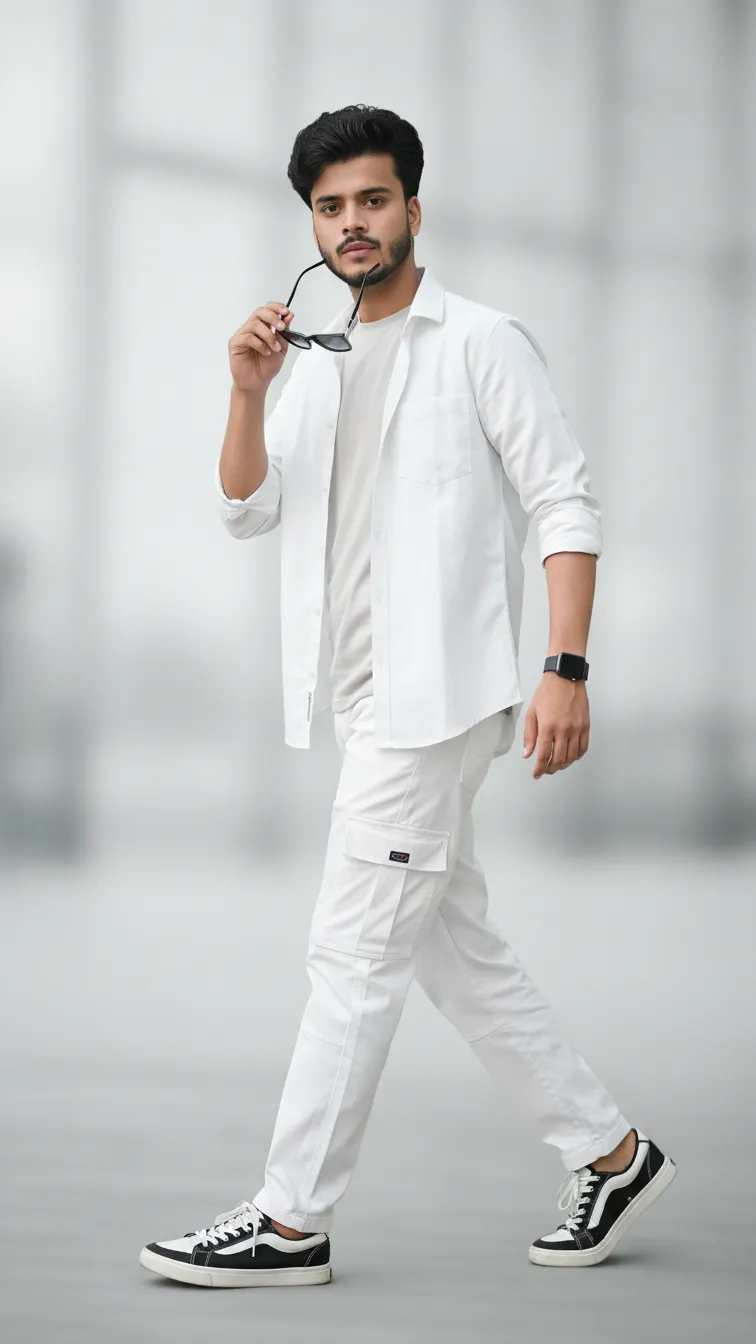
Modern Young Man Casual Fashion Portrait Prompt

Any Model
Modern Young Man Casual Fashion Portrait Prompt — AI generated image

The Prompt

Copy-Paste Prompt
Generate a young man, create a stylish, straight pose modern portrait (Casual confidence pose walking one step right side looking) wearing a white sleeve rolled up two unbuttoned shirt, and inside gray t-shirt, and white cargo pant, branded black white shoes, he's holding a sunglasses near his lips, single accessorized with a watch, The background is soft, minimal, and subtly blurred to emphasize a full body, contemporary fashion-forward vibe.
Subject A young man in a casual confidence pose walking one step right while looking forward, wearing a rolled-sleeve unbuttoned white shirt over a gray t-shirt, white cargo pants, and branded black-and-white shoes, accessorized with sunglasses near his lips and a watch.
Environment Soft, minimal, and subtly blurred background emphasizing a full-body view.
Lighting Not specified in source prompt.
Style Contemporary fashion-forward portrait.

How to Use this Any Model Prompt

1

Open Any Model

Launch the AI image tool.

2

Add Reference

Upload a photo if the prompt needs one.

3

Paste Prompt

Copy and paste the prompt above.

4

Generate

Create your AI image.

About This Modern Young Man Casual Fashion Portrait Prompt Prompt

This AI image prompt is designed to help you generate a clean, modern portrait of a young man striking a casual confidence pose. The subject is captured mid-step, walking slightly to the right while looking toward the camera, creating a dynamic yet natural sense of movement. The outfit features a rolled-sleeve white shirt worn unbuttoned over a gray t-shirt, paired with white cargo pants and distinct black and white shoes. This specific combination makes it a versatile fashion prompt for creators seeking a contemporary, urban aesthetic.

Ideal for fashion lookbooks, social media inspiration boards, and digital mood boards, this prompt appeals to anyone needing a realistic full-body visual of modern streetwear. The inclusion of subtle accessories—such as sunglasses held near the lips and a wristwatch—adds authentic detail that elevates the overall composition beyond a standard portrait. Whether you are building a conceptual portfolio or designing digital apparel displays, this structured layout ensures a sharp, coherent subject.

To use this prompt effectively, simply copy the text and paste it into your preferred AI image generator that supports detailed descriptive text. Because the composition relies heavily on specific clothing layers and accessories, ensure your chosen AI model processes all textual cues accurately. If the generator allows parameter adjustments, you can experiment with aspect ratios that suit full-body compositions, such as a vertical portrait format to capture the complete outfit from head to toe.

While the core outfit and pose are clearly defined, you can easily customize certain elements to fit your creative vision without breaking the overall style. Adjust the shirt or cargo pant colors to match a specific seasonal palette, or modify the footwear details while maintaining the contemporary streetwear vibe. Keeping the background minimal and softly blurred ensures that the primary focus remains entirely on the subject and his fashion choices, preventing visual clutter in the final image.

Ultimately, this visual style excels in digital spaces where clean lines and minimalist backgrounds help the subject stand out. The soft, subtly blurred environment creates a professional depth of field that mimics high-end editorial photography without requiring complex studio lighting descriptions. By leveraging this balanced composition, you can produce striking, fashion-forward imagery suitable for various modern creative and commercial applications.

Frequently Asked Questions

Common questions about this AI prompt and how to get the best results.

What kind of image does this prompt create?
It creates a full-body, contemporary fashion portrait of a young man in a casual walking pose, wearing layered streetwear and minimalist accessories against a softly blurred background.
Can I change the clothing colors in the prompt?
Yes, you can modify the clothing colors, such as the shirt or pants, to fit your specific aesthetic while keeping the overall casual streetwear structure.
What makes the background look blurred?
The prompt specifies a soft, minimal, and subtly blurred background to create depth and keep the visual focus entirely on the subject's full-body outfit.
What accessories are included in the prompt?
The subject is accessorized with sunglasses held near his lips and a single wristwatch, adding a natural, candid touch to the pose.
Is this prompt suitable for social media mood boards?
Yes, the contemporary fashion-forward vibe and clean composition make it ideal for Instagram mood boards, fashion portfolios, and digital design inspiration.

Pro Tips for Better Results

  • Use a vertical aspect ratio to ensure the full-body outfit and shoes are fully captured in the generated frame.
  • Keep the minimal background setting intact to maintain focus on the subject's streetwear attire.
  • Modify the clothing colors in the prompt text if you need to test different seasonal fashion palettes.
  • Ensure your AI generator supports detailed prop descriptions like holding sunglasses near the lips for accurate placement.
  • Pair this image style with clean, minimalist typography if using it for digital lookbooks or social media posts.
Message here



