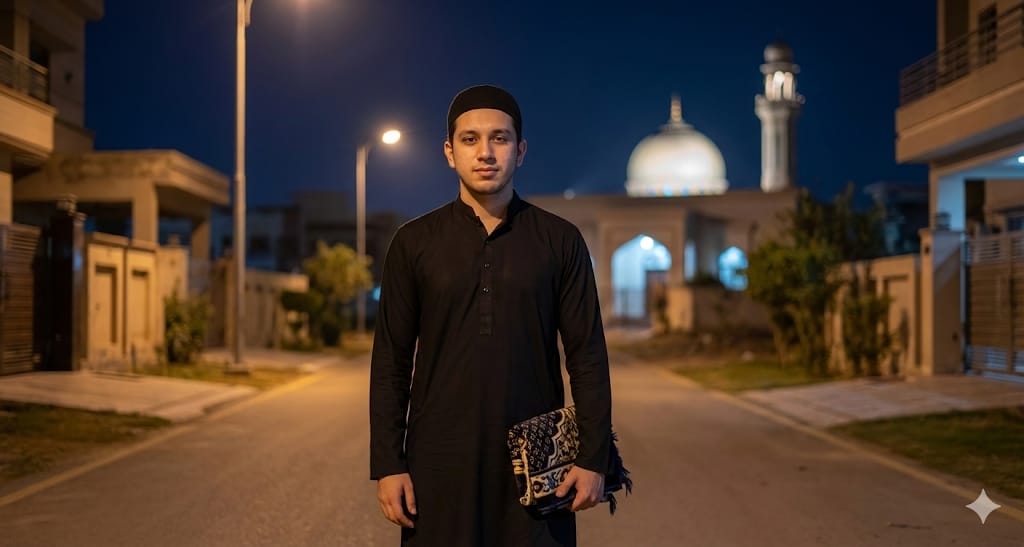
Ramadan AI Image

Nano Banana Nano Banana
Ramadan AI Image — AI generated image

The Prompt

Copy-Paste Prompt
Photorealistic portrait of a young man (original face, no change) standing in a residential area at night, natural lighting from street lights, Super HD 1080p quality. Mosque with dome and minaret softly lit in background, peaceful mood, dark bluish night sky. Full body pose facing camera, calm expression, wearing plain black kurta/gamis, black cap, holding a prayer mat. Realistic fabric details, sharp focus, slightly blurred background, natural colour tone.
Subject young man, full body pose, calm expression, original face, wearing plain black kurta/gamis, black cap, holding a prayer mat
Environment residential area at night, mosque with dome and minaret in background, dark bluish night sky
Lighting natural lighting from street lights, mosque softly lit
Style Photorealistic portrait, Super HD 1080p quality, realistic fabric details, sharp focus, slightly blurred background, natural colour tone, peaceful mood

How to Use this Nano Banana Prompt

1

Open Nano Banana

Launch the AI image tool.

2

Add Reference

Upload a photo if the prompt needs one.

3

Paste Prompt

Copy and paste the prompt above.

4

Generate

Create your AI image.

About This Ramadan AI Image Prompt

This AI image prompt generates a captivating **photorealistic man mosque portrait prompt**, depicting a young man standing in a residential area at night. It captures a peaceful mood, with natural lighting from street lights illuminating the scene and a softly lit mosque in the background. Users can expect Super HD 1080p quality, a full-body portrait with sharp focus on the subject, realistic fabric details of his plain black kurta/gamis and cap, and a slightly blurred background, all rendered in natural color tones. The prompt ensures a calm expression and the man holding a prayer mat, creating a serene and authentic visual.

This prompt is ideal for content creators, artists, and individuals seeking to generate culturally rich and serene imagery. It's particularly useful for projects requiring a realistic night portrait prompt with specific cultural or spiritual elements. Photographers looking for inspiration for night photography, designers creating visuals for community or religious events, or anyone needing a peaceful night scene AI prompt can leverage this to produce high-quality, evocative images without needing complex photography setups.

To use this prompt, simply copy the entire text into your preferred AI image generation tool. Since no specific AI model is mentioned, this prompt is designed to be versatile across platforms like Midjourney, Stable Diffusion, or DALL-E 3. Paste the prompt directly into the text input field. For best results, ensure your chosen AI tool is set to generate photorealistic images and can accurately interpret detailed environmental and stylistic cues like "natural lighting from street lights" and "softly lit mosque."

While the core elements of this **photorealistic man mosque portrait prompt** are precise, you can explore subtle customizations. For instance, you could experiment with varying the time of night (e.g., "early night" or "late night") to adjust the intensity of the "dark bluish night sky." You might also specify different types of residential architecture if your AI model allows, or subtly alter the "plain black kurta/gamis" to other dark, plain colors if you wish to maintain the overall peaceful aesthetic. Remember to keep the "original face, no change" instruction for consistent character generation.

The distinct visual style created by this prompt, combining photorealism with a peaceful nocturnal setting and cultural elements, makes it highly versatile. It’s excellent for social media posts aiming for a contemplative tone, suitable for online articles discussing cultural themes, or as a visual asset for storytelling. The sharp focus on the subject and realistic fabric details ensure a professional look, while the slightly blurred background adds depth, making the image suitable for various digital and print applications. This prompt delivers a cohesive and impactful visual narrative.

Frequently Asked Questions

Common questions about this AI prompt and how to get the best results.

What kind of image does this prompt create?
This prompt generates a photorealistic night portrait of a young man in traditional attire, standing in a residential area with a softly lit mosque in the background. It emphasizes a peaceful mood and Super HD 1080p quality.
Can I change the man's appearance or clothing?
The prompt specifies "original face, no change" for consistency, but you could subtly adjust the "plain black kurta/gamis" to similar dark, plain traditional wear. Avoid drastic changes to maintain the prompt's core intent.
What AI models work best with this prompt?
This prompt is designed for versatility and should work well with any advanced AI image generator capable of photorealism, such as Midjourney, Stable Diffusion, or DALL-E 3. Focus on models that excel at detailed environmental and lighting descriptions.
How can I ensure the "peaceful mood" comes through?
The prompt already includes "peaceful mood" and elements like "softly lit mosque" and "calm expression." For stronger emphasis, you could add terms like "serene atmosphere" or "tranquil scene" if your AI model responds well to such modifiers.
What is the significance of the "prayer mat" in the prompt?
The inclusion of a "prayer mat" and the mosque background adds a layer of cultural and spiritual context to the portrait. It helps to define the character's identity and reinforces the overall peaceful and respectful tone of the image.

Pro Tips for Better Results

  • Emphasize "photorealistic" in your AI settings if available, to ensure the highest level of realism in the output.
  • Experiment with minor variations in the "residential area" description, such as "cobblestone street" or "modern residential street," to subtly alter the background texture.
  • If your AI tool supports it, try adding a negative prompt for "harsh shadows" or "overly bright lights" to enhance the "natural lighting from street lights" effect.
  • To refine the "dark bluish night sky," you can specify different shades like "deep indigo night sky" or "midnight blue sky" to fine-tune the nocturnal atmosphere.
  • For a slightly different focus, instruct the AI to place the mosque more prominently or more subtly in the "slightly blurred background" to control depth.
Message here



