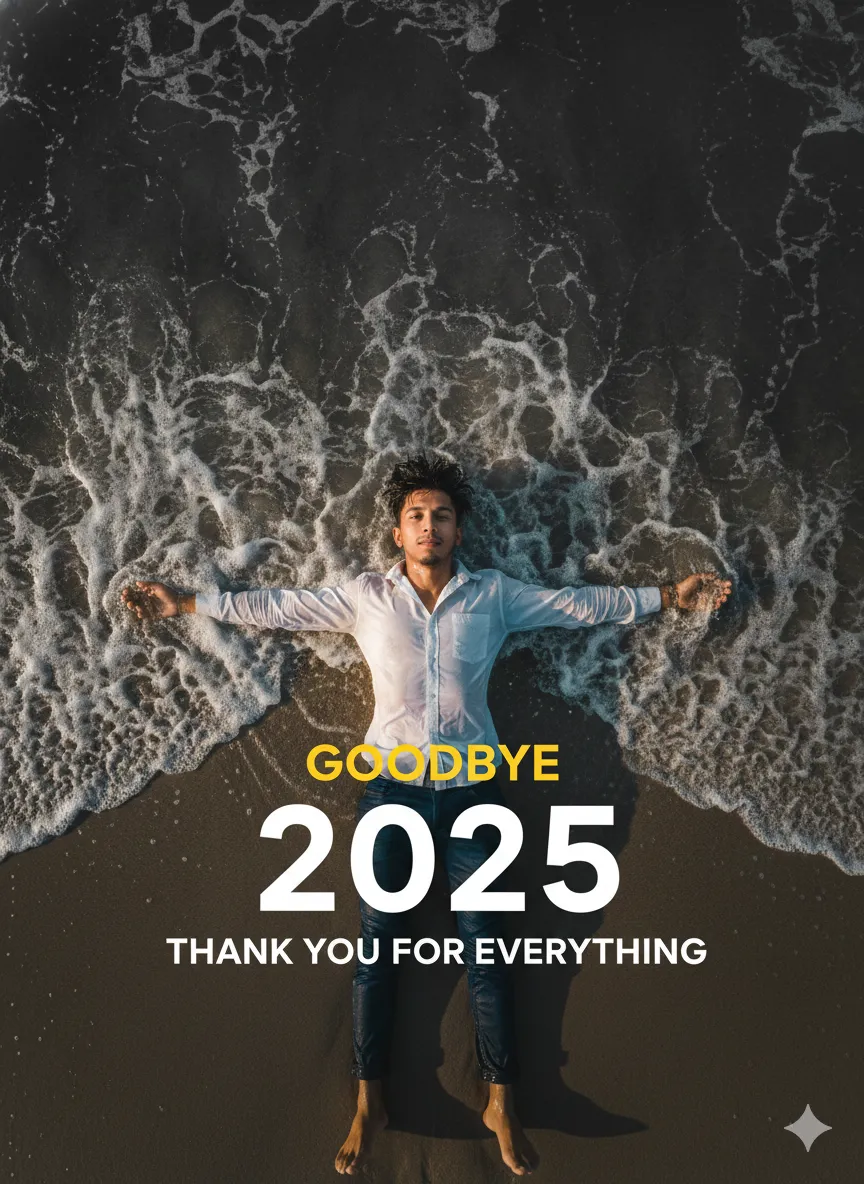
2025 Goodbye Beach Portrait

Nano Banana Nano Banana
2025 Goodbye Beach Portrait — AI generated image

The Prompt

Copy-Paste Prompt
Create a 8k cinematic Portrait of wide-angle aerial top-down shot of young man with stylish messy hair fallen in face, with All features lying on sea beach at shoreline, white button shirt, wet blue trousers, arms outstretched, dark moody monochrome ocean waves crashing around, golden hour glow, bold white '2025' with scrolling yellow 'GOODBYE' above, 'THANK YOU FOR EVERYTHING' below — cinematic, high contrast, minimalist, dramatic. (Face 100% accurate like uploaded photo)
Subject Young man with stylish messy hair fallen in face, white button shirt, wet blue trousers, arms outstretched. Features bold white '2025' with scrolling yellow 'GOODBYE' above, 'THANK YOU FOR EVERYTHING' below.
Environment Sea beach at shoreline, dark moody monochrome ocean waves crashing around.
Lighting Golden hour glow.
Style 8k cinematic Portrait, wide-angle aerial top-down shot, high contrast, minimalist, dramatic.

How to Use this Nano Banana Prompt

1

Open Nano Banana

Launch the AI image tool.

2

Add Reference

Upload a photo if the prompt needs one.

3

Paste Prompt

Copy and paste the prompt above.

4

Generate

Create your AI image.

About This 2025 Goodbye Beach Portrait Prompt

This AI prompt is designed to generate a stunning 8k cinematic portrait of a young man on a sea beach. The image features a wide-angle, aerial top-down perspective, capturing the subject lying at the shoreline with stylish messy hair. The scene is imbued with a dark, moody atmosphere, highlighted by monochrome ocean waves crashing around and a beautiful golden hour glow. Specific text overlays, including '2025', 'GOODBYE', and 'THANK YOU FOR EVERYTHING', add a narrative layer, making this a powerful visual for reflective or commemorative themes. This cinematic portrait man beach prompt delivers a high-contrast, minimalist, and dramatic aesthetic.

Content creators, photographers, and artists looking to produce impactful, storytelling visuals will find this prompt incredibly useful. It's ideal for crafting end-of-year reflections, promotional material with a poignant message, or dramatic social media content. The unique aerial perspective and the combination of moody elements with a golden hour glow make it perfect for evoking strong emotions and capturing attention. Use this prompt to create a distinctive visual narrative that stands out.

To use this cinematic portrait man beach prompt, simply copy the full text and paste it into your preferred AI image generation tool. If your AI model supports it, utilize the 'uploaded photo' feature to ensure the face accuracy matches your reference, as indicated in the prompt. The detailed descriptions of the subject's attire—a white button shirt and wet blue trousers—along with the specific environmental and stylistic cues, guide the AI to produce a highly specific and artistic output.

Customization options for this prompt are plentiful, allowing you to fine-tune the final image. You could experiment with different hair styles or colors for the young man, or adjust the specific wording and placement of the '2025', 'GOODBYE', and 'THANK YOU FOR EVERYTHING' text overlays to suit your message. Modifying the intensity of the 'dark moody monochrome ocean waves' or tweaking the 'golden hour glow' can dramatically alter the emotional impact of the cinematic portrait. Consider adjusting the overall 'high contrast' or 'minimalist' elements to achieve a slightly different visual tone.

The visual style generated by this cinematic portrait man beach prompt is exceptionally well-suited for social media and creative projects. The dramatic composition, high contrast, and specific text overlays make for highly shareable and engaging content. Whether for a personal project, a reflective post, or a unique artistic piece, this prompt provides a foundation for creating images that tell a story and resonate with viewers. The blend of a powerful subject, a moody environment, and specific stylistic elements ensures a memorable and visually striking outcome.

Frequently Asked Questions

Common questions about this AI prompt and how to get the best results.

How can I ensure the 'Face 100% accurate like uploaded photo' aspect works?
To achieve this, your AI image generator must have a feature that allows you to upload a reference photo for facial accuracy. Look for options like 'image prompt' or 'face reference' within your chosen AI tool.
Can I change the text overlays in the prompt?
Yes, you can easily modify '2025', 'GOODBYE', and 'THANK YOU FOR EVERYTHING' to any text or numbers you desire. Simply edit these phrases directly in the prompt before generating your image.
What kind of visual style does this prompt produce?
This prompt generates an 8k cinematic portrait with a wide-angle aerial top-down view. It emphasizes high contrast, a minimalist composition, and a dramatic, moody aesthetic, highlighted by a golden hour glow.
Is this prompt suitable for different genders or ages?
While the prompt specifies 'young man', you can experiment by changing 'young man' to 'young woman' or 'person' to see how the AI adapts. However, the core visual elements and mood are designed around the original subject.
How can I make the ocean waves appear less 'moody'?
To lessen the 'dark moody monochrome' effect of the waves, you can remove those specific adjectives from the prompt. You might replace them with descriptions like 'gentle clear ocean waves' or 'sparkling blue ocean waves' to achieve a different tone.

Pro Tips for Better Results

  • For precise facial features, ensure your AI tool supports and utilize the 'uploaded photo' reference for 100% face accuracy.
  • Experiment with changing the specific year ('2025') and the 'GOODBYE'/'THANK YOU FOR EVERYTHING' text to personalize your message.
  • Adjust the 'golden hour glow' intensity to shift between a softer, ethereal light and a more dramatic, intense warmth.
  • Modify 'dark moody monochrome ocean waves' to explore variations in wave size, texture, or even a subtle color tint for the water.
  • Play with the 'wide-angle aerial top-down shot' perspective by slightly altering the angle or zoom to find your perfect dramatic view.
Message here



